Watch first
Wireless Fundamentals (Day 55)
Video credit: Jeremy's IT Lab
Watch on YouTubeWiFi Explained (CCNA Part 1)
Video credit: David Bombal
Watch on YouTubePlain-English explanation
Wi-Fi is Layer 2 wireless Ethernet (802.11). Clients associate to an access point using an SSID (network name). Each radio has a BSSID (AP MAC). 2.4 GHz has three non-overlapping channels (1, 6, 11 in North America); 5 GHz offers more channels and less interference but shorter range.
RF is shared media — distance, walls, interference, and power all affect SNR and throughput.
Deep dive

Wireless LAN components — AP, WLC, and client roles.
Supplementary figure from Panagiss CCNAmd
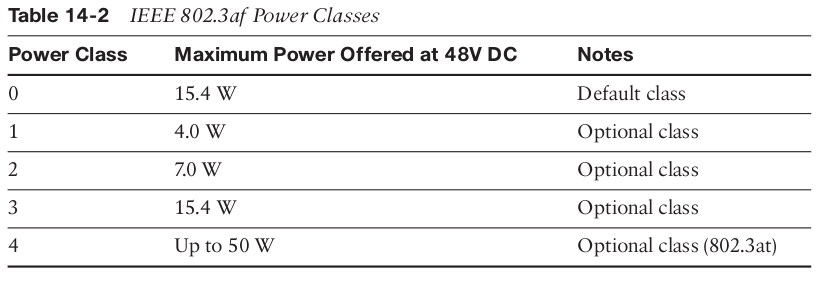
PoE power classes for APs and IP phones.
From study charts · jdepew88 CCNA notes
Additional topic reference
802.11 standards (awareness): 802.11n/ac/ax — CCNA focuses concepts not deep PHY. Know 2.4 vs 5 GHz tradeoffs.
| Band | Pros | Cons | |------|------|------| | 2.4 GHz | Range, penetration | Congested, fewer channels | | 5 GHz | Speed, more channels | Shorter range, more APs needed |
Association steps (simplified): Probe → Authenticate → Associate → (4-way handshake if WPA2/3).
AP modes: Autonomous (standalone), lightweight (CAPWAP to WLC), mesh — next lesson covers WLC detail.
CSMA/CA: Wireless uses collision avoidance (listen before talk) — hidden node problem motivates RTS/CTS (awareness).
Step-by-step — 2.4 GHz channel plan
Three APs in open office:
- AP1 → channel 1
- AP2 → channel 6
- AP3 → channel 11
Avoid 1-2-3 overlap pattern — channels overlap in 2.4 GHz. Use the wireless channel planner tool in the next lesson.
Commands to know
dot11 ssid CORP-WIFI
vlan 10
authentication open
!
interface Dot11Radio0
ssid CORP-WIFI
channel 11
show wlan summary
show ap summary
Troubleshooting
| Symptom | Check | |---------|-------| | Slow Wi-Fi | Co-channel interference, wrong channel width | | Can't see SSID | AP down, wrong band, max clients | | Connects no IP | VLAN mapping, DHCP, gateway | | Random drops | RF noise, power save, roaming |
Wi-Fi issues are often VLAN/DHCP, not "magic RF."
Exam relevance
Channels 1, 6, and 11 are non-overlapping in 2.4 GHz — channel 3 overlaps both 1 and 6.
Multiple APs can share one SSID (same name) but each radio BSSID is unique.
Practice checklist
- Draw 2.4 GHz channel overlap diagram for channels 1–11
- Explain 2.4 vs 5 GHz choice for warehouse vs office
- List association steps from client perspective
- Identify SSID vs BSSID in a Wi-Fi scanner app
- Preview WLC architecture in next lesson
Which 2.4 GHz channels are commonly non-overlapping in North America?
What does SSID identify?