Watch first
Subnetting Mastery Part 3 — 60-Second Method
Video credit: Jeremy's IT Lab
Watch on YouTubeHexadecimal to Decimal Made Easy! (Video #16)
Video credit: David Bombal
Watch on YouTubePlain-English explanation
CIDR notation appends the prefix length after a slash: 192.168.10.0/26 means the first 26 bits are the network portion. The subnet mask is the same information in dotted decimal — network bits are 1s, host bits are 0s.
Examples in the last octet:
/24→255.255.255.0/25→255.255.255.128/26→255.255.255.192/27→255.255.255.224/28→255.255.255.240
Additional topic reference
Deep dive
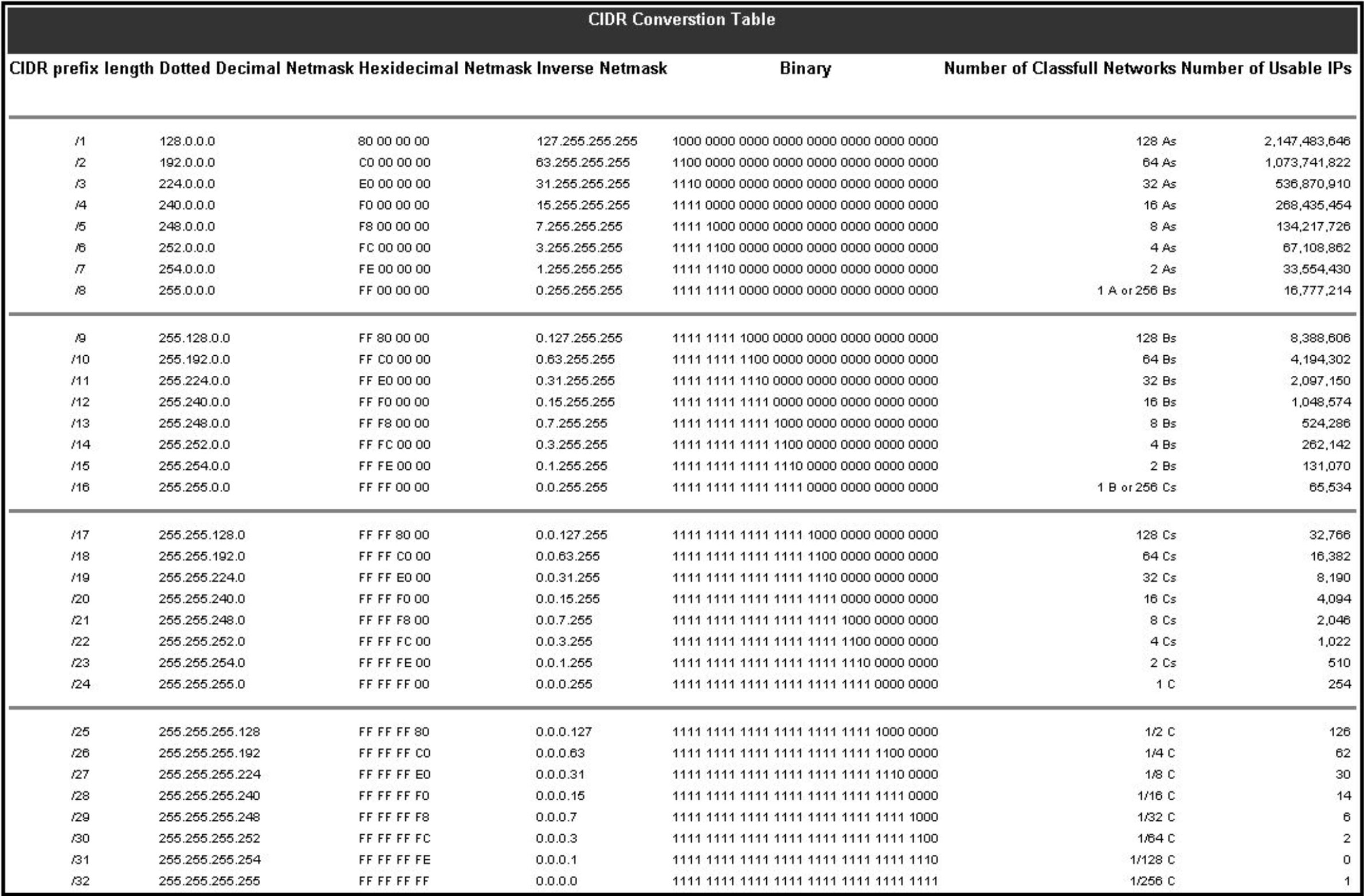
CIDR prefix to subnet mask conversion table.
From study charts · jdepew88 CCNA notes
Binary view of /26 last octet: 11000000 = 128+64 = 192
Contiguous 1s from the left is required for valid subnet masks. 255.255.255.200 is invalid (non-contiguous).
Cross-octet prefixes: /20 means 20 network bits:
- Mask:
255.255.240.0(third octet: 11110000 = 240) - Block size 16 in the third octet
/23, /22, etc.: Practice borrowing bits across octet boundaries — exam favorites.
| Prefix | Mask | Block size (typical) | |--------|------|----------------------| | /8 | 255.0.0.0 | 2^24 in last three octets | | /16 | 255.255.0.0 | 256 in third octet | | /24 | 255.255.255.0 | 256 in fourth octet | | /30 | 255.255.255.252 | 4 addresses — WAN links |
Step-by-step — convert /20 to mask and block
- 20 network bits → four bits in third octet (16–19)
- Third octet binary:
11110000= 240 - Mask:
255.255.240.0 - Block size in third octet: 256 − 240 = 16
- Networks: x.x.0.0, x.x.16.0, x.x.32.0 …
Commands to know
interface GigabitEthernet0/0
ip address 192.168.10.1 255.255.255.192
!
interface GigabitEthernet0/1
ip address 10.10.0.1 255.255.240.0
show ip interface brief
show running-config interface GigabitEthernet0/0
Troubleshooting
| Issue | Check | |-------|-------| | Hosts same IP range, can't communicate | Mismatch mask — one /24, one /25 | | Routing summary wrong | Mask doesn't align with summary boundary | | ACL doesn't match intended subnet | Confused mask with wildcard |
Always write CIDR and mask together during design — they are two views of one truth.
Exam relevance
Do not confuse subnet mask with wildcard mask. They are inverses, not the same thing. Subnet 1 = network; wildcard 0 = must match.
For last-octet prefixes, list 128, 192, 224, 240, 248, 252 paired with /25–/30 — speed beats brute-force binary on exam day.
Practice checklist
- Convert /17, /20, /22, /25, /28 between CIDR and dotted decimal
- Spot invalid masks (non-contiguous 1s) in a list of five
- Given a mask, state the CIDR prefix without counting bit-by-bit slowly
- Configure two interfaces with different masks and verify with
show ip int brief - Complete subnetting trainer drills focused on mask conversion
What is the subnet mask for /27?
Which subnet mask is invalid?