Watch first
Subnetting Mastery Part 1 — Seven Attributes
Video credit: Jeremy's IT Lab
Watch on YouTubeSubnetting Part 1 (Day 13)
Video credit: Jeremy's IT Lab
Watch on YouTubeAlso watch — playlist supplement
Binary — How Does That Work? (Video #13)
Video credit: David Bombal
Watch on YouTubeBinary IP Conversions (Video #14)
Video credit: David Bombal
Watch on YouTubePlain-English explanation
Subnetting splits one big address block into smaller networks. The CIDR prefix (e.g., /26) tells you how many bits belong to the network portion. Everything left over identifies hosts — minus network and broadcast addresses in classic IPv4 subnets.
If /24 is one classroom of 256 seats, /25 splits it in half (128 addresses each), /26 into quarters (64 each), and so on. Each +1 to the prefix halves the block size.
Deep dive
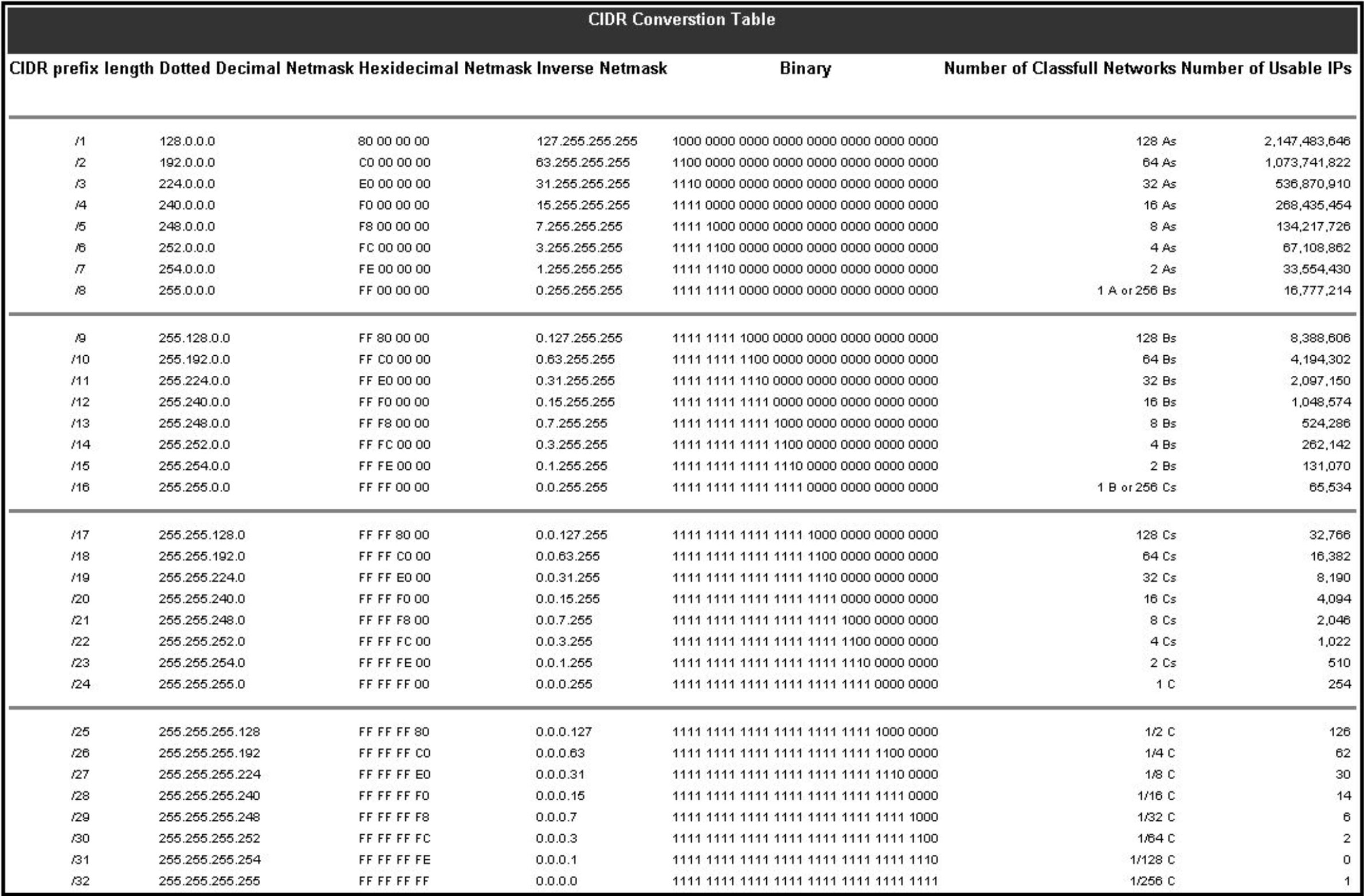
Keep this table nearby while drilling subnetting.
From study charts · jdepew88 CCNA notes
The seven attributes (learn to find all seven for any address/prefix):
- CIDR notation
- Subnet mask (dotted decimal)
- Network address (host bits = 0)
- Broadcast address (host bits = 1)
- First usable host
- Last usable host
- Total / usable host count
Block size shortcut: For prefixes in the last octet, subtract mask octet from 256.
/24→ mask .0 → block 256/25→ mask .128 → block 128/26→ mask .192 → block 64/27→ mask .224 → block 32/28→ mask .240 → block 16/29→ mask .248 → block 8/30→ mask .252 → block 4
Host bits: 32 - prefix = host bits. Total addresses = 2^host bits. Classic usable = total − 2 (network + broadcast).
Step-by-step — find the subnet of 192.168.10.45/26
/26→ block size 64 in the last octet- Multiples of 64: 0, 64, 128, 192 — 45 falls in 0–63 block
- Network:
192.168.10.0 - Broadcast:
192.168.10.63 - Usable:
192.168.10.1–192.168.10.62(62 hosts) - Mask:
255.255.255.192
Commands to know
interface GigabitEthernet0/0
ip address 192.168.10.1 255.255.255.192
!
show ip interface GigabitEthernet0/0
Troubleshooting
| Mistake | Result | |---------|--------| | Wrong mask on host | Host thinks neighbor is remote → traffic via gateway fails | | Wrong gateway subnet | ARP fails or asymmetric routing | | Overlapping subnets | Intermittent reachability, routing loops | | Block size miscalculation | Off-by-one broadcast errors on exams |
When two hosts "can't talk on the same VLAN," verify they share the same network address per their masks before chasing ARP.
Exam relevance
Memorize the /24 boundary first, then halve block sizes as the prefix number increases by 1 in the same octet.
Usable host count is not always 2^n - 2 for /31 and /32 in modern point-to-point use — CCNA still tests classic rules heavily; know both exist.
Practice checklist
- Given any /24–/29, state block size in under 5 seconds
- For five random host/prefix pairs, list all seven attributes
- Explain why
/28wastes fewer addresses than/24for a 10-host LAN - Complete 10 timed drills on the subnetting trainer
- Teach the block-size method to someone else without notes
How many total addresses are in a /26 subnet?
You need at least 50 usable host addresses. What is the smallest typical prefix?