Watch first
IPv4 Addressing Part 1 (Day 7)
Video credit: Jeremy's IT Lab
Watch on YouTubePlain-English explanation
An IPv4 address is a 32-bit number written as four decimal octets (0–255 each), like 192.168.10.45. Every interface on the Internet that must be reached globally needs a unique public address. Inside organizations, private ranges can be reused on isolated networks and translated at the edge with NAT.
RFC 1918 private ranges (know cold):
10.0.0.0/8— one big class A block (10.0.0.0 – 10.255.255.255)172.16.0.0/12— 172.16.0.0 – 172.31.255.255192.168.0.0/16— 192.168.0.0 – 192.168.255.255
Deep dive
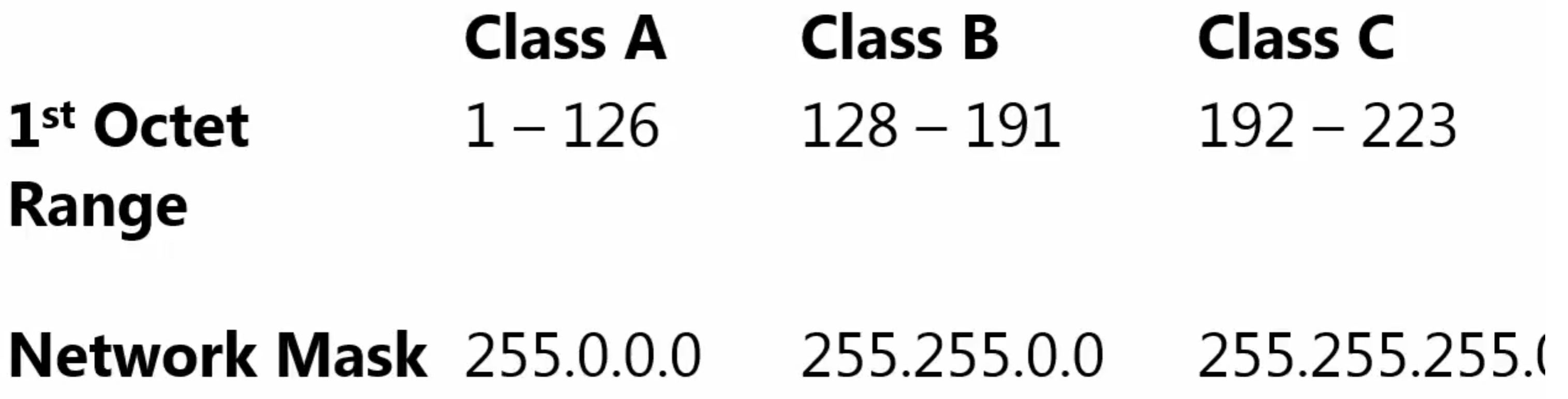
Classful IPv4 ranges (historical context — CIDR replaced classes).
From study charts · jdepew88 CCNA notes
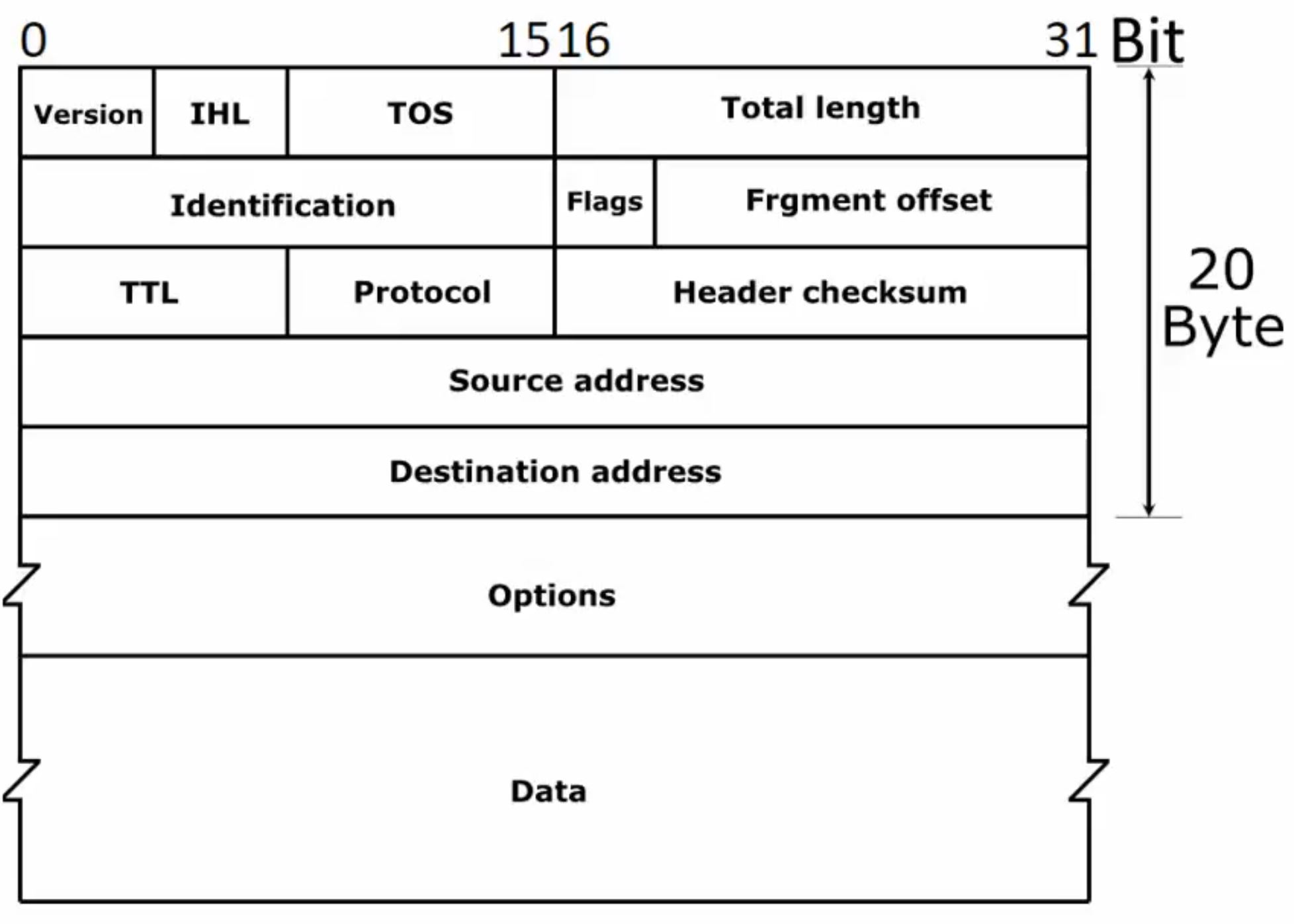
IPv4 packet header fields.
From study charts · jdepew88 CCNA notes
Special-use ranges (high-yield for CCNA):
| Range | Purpose | |-------|---------| | 127.0.0.0/8 | Loopback (127.0.0.1) | | 169.254.0.0/16 | Link-local / APIPA (no DHCP) | | 224.0.0.0 – 239.255.255.255 | Multicast | | 240.0.0.0+ | Reserved / limited exam focus |
Public vs private: If an address is not in RFC 1918 (and not special-use), it is routable on the public Internet — subject to ISP allocation.
NAT role: Many private hosts share one or a pool of public IPs. The router tracks translations (inside local ↔ inside global). CCNA depth on NAT comes in Week 6 — here, know why private space exists.
Step-by-step — classify addresses
Classify each:
10.50.1.1→ private (10/8)172.30.5.1→ private (172.16–31)192.168.99.1→ private (192.168/16)8.8.8.8→ public169.254.10.5→ APIPA link-local127.0.0.1→ loopback
Invalid host examples: network address (host bits all 0), broadcast (host bits all 1) — detailed subnet math in Week 2.
Commands to know
show ip interface brief
show running-config interface GigabitEthernet0/0
Windows
ipconfig /all
Linux
ip addr show
Troubleshooting
| Symptom | Likely issue | |---------|--------------| | 169.254.x.x address | DHCP failure — check server, relay, VLAN | | Duplicate IP warnings | Two hosts same address — ARP flapping | | Cannot reach Internet, local OK | Missing NAT, wrong default route, public routing | | VPN overlap | Both sides use same private range — renumber or NAT |
Plan addressing before mergers and cloud VPC peering — overlap breaks routing even with NAT.
Exam relevance
169.254.0.0/16 is APIPA/link-local — usually means DHCP failure, not a normal static plan.
172.15.x.x and 172.32.x.x are not private. Only 172.16.0.0–172.31.255.255 fall in 172.16.0.0/12.
Practice checklist
- Recite all three RFC 1918 ranges with CIDR notation
- Classify ten random addresses as public, private, or special-use
- Explain why two companies can both use 192.168.1.0/24 internally
- Identify APIPA and loopback addresses in
ipconfigoutput - Sketch a small LAN with private hosts and one public WAN address
Which address is private?
A Windows PC shows 169.254.50.10. What is the most likely cause?