Watch first
MAC Address Explained
Video credit: PowerCert Animated Videos
Watch on YouTubeEthernet LAN Switching (Day 5)
Video credit: Jeremy's IT Lab
Watch on YouTubeAlso watch — playlist supplement
Hexadecimal, ARP and MAC Address Learning
Video credit: David Bombal
Watch on YouTubeEthernet BIA? A Bus? (Video #3)
Video credit: David Bombal
Watch on YouTubePlain-English explanation
Ethernet delivers frames using 48-bit MAC addresses (burned-in or configured). Switches maintain a MAC address table (CAM table): source MAC on incoming frames is recorded against the incoming port. Unknown unicast destinations are flooded out all ports except the source until the switch learns where the host lives.
ARP (Address Resolution Protocol) maps a known IPv4 address to a MAC address on the local subnet. ARP requests are broadcast ("who has 192.168.1.1?"); replies are unicast back to the requester.
Routers do not forward ARP across subnets — if the destination is remote, ARP targets the default gateway, not the remote IP.
Deep dive
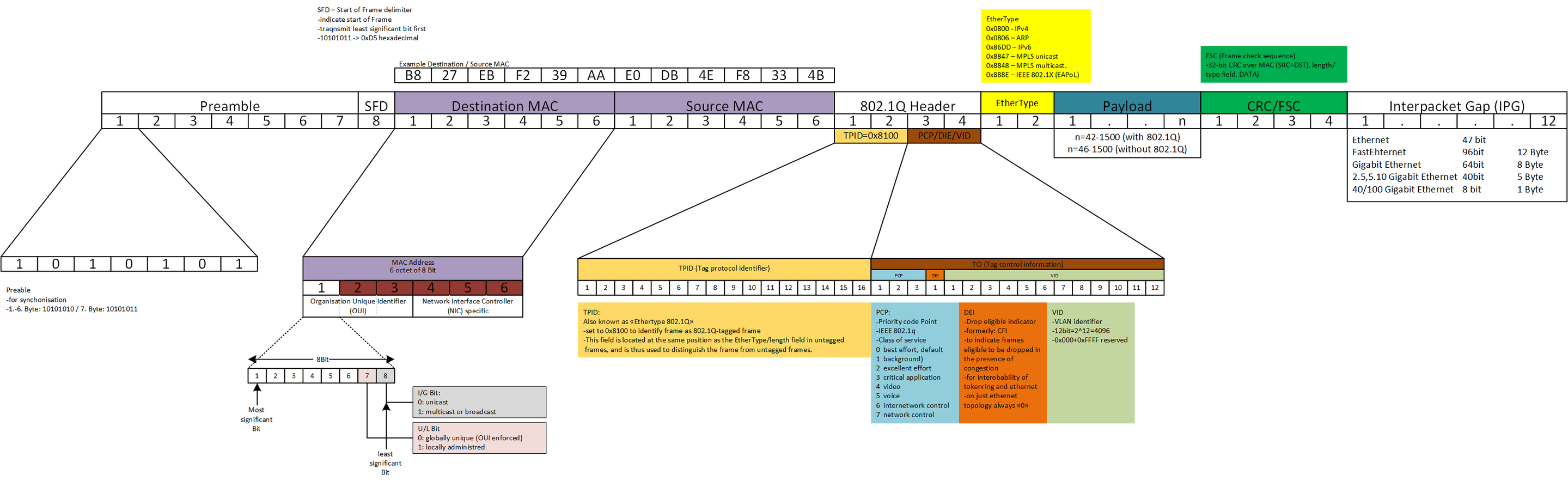
Ethernet II frame fields — destination MAC, source MAC, Type, and payload.
From study charts · jdepew88 CCNA notes
Unicast vs broadcast vs multicast frames:
- Unicast — one destination MAC
- Broadcast —
FF:FF:FF:FF:FF:FF, all hosts on VLAN process it - Multicast — group address; modern switches can snoop IGMP for efficiency
Collision domains: Switches microsegment — each port is typically its own collision domain (full duplex). Hubs shared collisions (legacy).
Broadcast domains: One VLAN = one broadcast domain. Routers (and L3 boundaries) separate broadcast domains.
Gratuitous ARP: Host announces "I am IP X, MAC Y" — used after IP change or by some FHRP protocols. Know it exists for exams.
Step-by-step — first ping on a LAN
PC 192.168.1.10 pings 192.168.1.20 (same /24):
- PC checks subnet — local delivery
- ARP cache empty for .20 → ARP request broadcast: "Who has 192.168.1.20?"
- .20 replies unicast with its MAC
- PC builds ICMP echo inside IP inside Ethernet frame to .20's MAC
- Switch learns PC's MAC on Fa0/1, .20's MAC on Fa0/2, forwards unicast
If target were remote, step 2 would ARP for the gateway MAC instead.
Commands to know
show mac address-table
show mac address-table dynamic
show ip arp
clear mac address-table dynamic
Windows
arp -a
Linux
ip neigh show
Troubleshooting
| Problem | Likely cause | Fix direction |
|---------|--------------|---------------|
| IP configured, no L2 delivery | ARP failure, wrong VLAN | Verify VLAN/port, show ip arp |
| Intermittent connectivity | MAC flapping, loop | STP, check duplicate MAC/IP |
| Switch CPU high | Broadcast storm | Find loop, BPDU guard, storm control |
| Wrong host receives traffic | Stale MAC entry | Clear dynamic MAC, check topology |
"Works for a minute then stops" often means a loop or duplicate IP causing ARP/MAC instability.
Exam relevance
Routers strip and rebuild Layer 2 headers at each hop. ARP does not cross router boundaries — each subnet ARPs independently.
A switch floods unknown unicast until it learns the destination MAC. Excessive flooding suggests flapping, mis-cabling, or a missing host.
Practice checklist
- Explain how a switch populates its MAC table from a single frame
- Draw ARP request/reply including broadcast vs unicast
- State why ARP is limited to one broadcast domain
- Predict flood vs forward for unknown and known unicast MACs
- Use packet walk tool to narrate ARP before the first ping
What does a host send when it knows the destination IP but not the MAC on the same subnet?
PC sends to a remote server on another subnet. Who does it ARP for?