Watch first
OSI Model & TCP/IP Suite (Day 3)
Video credit: Jeremy's IT Lab
Watch on YouTubeAlso watch — playlist supplement
The OSI Model is a Lie! (Video #8)
Video credit: David Bombal
Watch on YouTubeProtocol Wars! TCP/IP (Video #9)
Video credit: David Bombal
Watch on YouTubePlain-English explanation
The OSI model is a troubleshooting map, not a trivia list. When someone says "Layer 2 issue," they mean switching, MAC addresses, VLANs, or STP — not "please recite all seven layers backward."
TCP/IP is what networks actually run: Network Access (L1+L2), Internet (L3), Transport (L4), Application (L5–7). CCNA still uses OSI language in questions, so you need a practical mapping, not a song.
Deep dive
| OSI layer | Name | Real examples | Devices / scope | |-----------|------|---------------|-----------------| | 7 | Application | HTTP, DNS, DHCP messages | Host software | | 6 | Presentation | SSL/TLS encryption, encoding | Often bundled with app | | 5 | Session | Session management | Often bundled with app | | 4 | Transport | TCP, UDP, ports | End-to-end on hosts | | 3 | Network | IP, ICMP, routing | Routers | | 2 | Data Link | Ethernet, MAC, VLANs, ARP | Switches | | 1 | Physical | Cables, optics, bits | Hubs (legacy), NIC PHY |
CCNA collapses 5–7 into "Application" for most questions. Focus on where a problem lives:
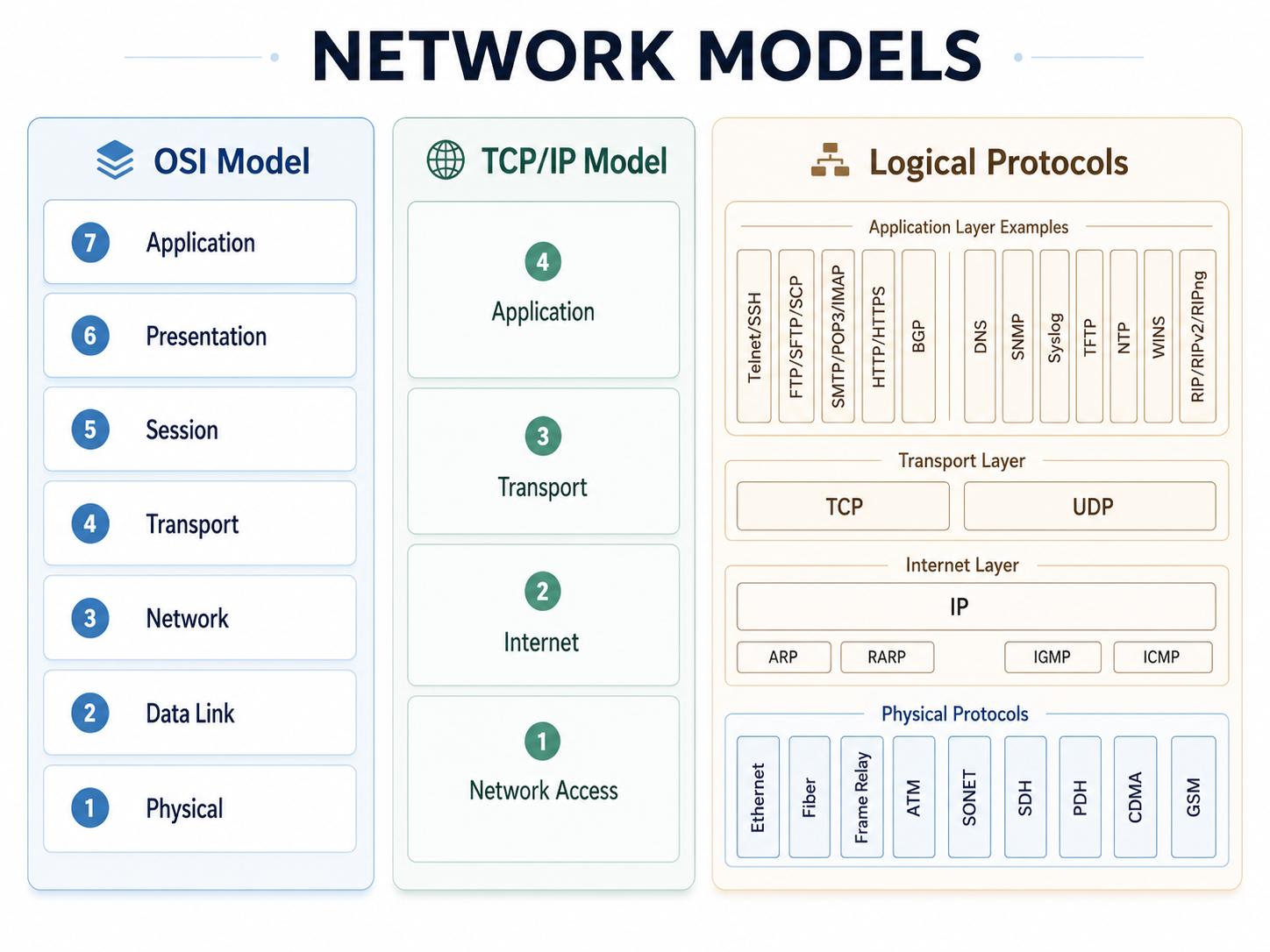
OSI vs TCP/IP model — layer mapping for troubleshooting.
From study charts · jdepew88 CCNA notes
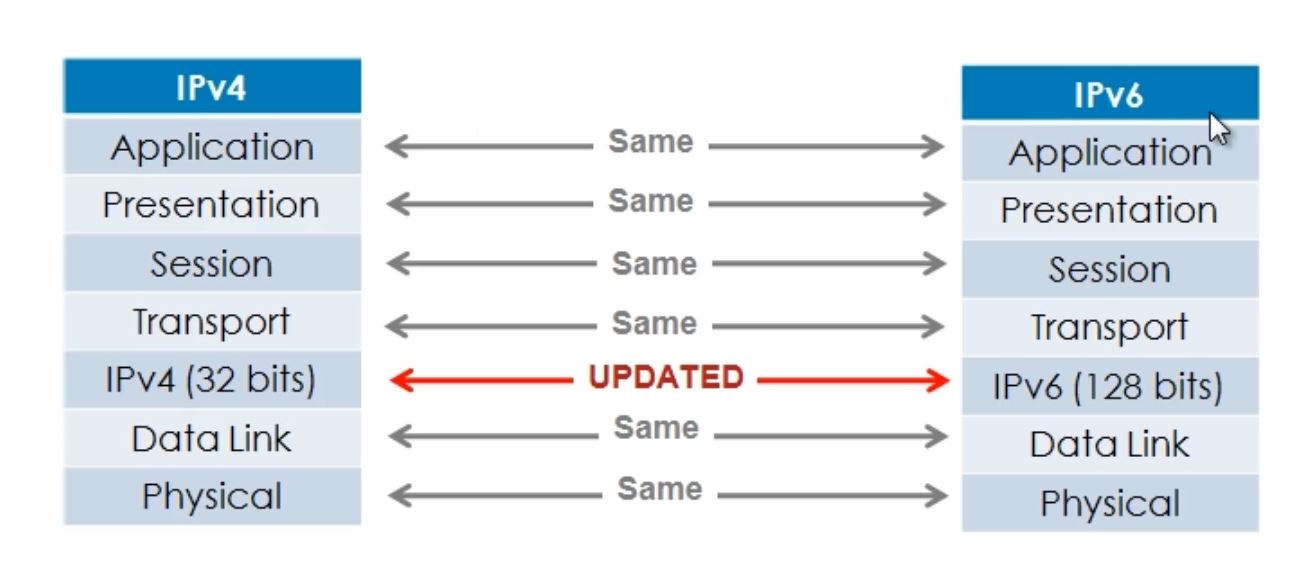
Where IPv4 and IPv6 live in the OSI stack.
From study charts · jdepew88 CCNA notes
- Cable errors → L1
- ARP/VLAN/STP → L2
- Routing/subnets → L3
- TCP retransmits / port blocks → L4
- Browser/DNS/app auth → L7
Step-by-step — layer isolation in a break
User reports: "I can ping google.com but Chrome won't load pages."
- L3 OK? Ping resolves and reaches — IP routing and ICMP work
- L4/L7? Browser uses TCP 443 — test with
curlor telnet to port 443 - DNS? Ping used cached IP or different path — try
nslookup google.com - Conclusion: Likely application-layer (proxy, TLS) or TCP/443 block, not basic routing
Another scenario: "Nothing leaves the VLAN."
- Check L2: correct VLAN on port, trunk allows VLAN
- Check L3: default gateway on host, SVI up on switch
- ARP: can host resolve gateway MAC?
Commands to know
show interfaces status          ! L1 link up/down
show mac address-table          ! L2 switching
show ip arp                     ! L2/L3 boundary
show ip route                   ! L3 forwarding
show ip sockets                 ! L4 (where supported)
Troubleshooting
Work top-down (app → cable) for user complaints, bottom-up (link → app) for new installs.
| Symptom | Start at | |---------|----------| | Link light off | L1 — cable, SFP, speed/duplex | | MAC flapping / STP blocks | L2 | | Wrong subnet / no route | L3 | | Session resets, RST | L4 | | Certificate / HTTP errors | L7 |
Do not skip layers. "Ping works" only proves ICMP at L3 — not that TCP port 443 is open.
Exam relevance
7 Application · 4 Transport · 3 Network · 2 Data Link · 1 Physical — attach real protocols to each number, not mnemonics alone.
Routing is Layer 3. Switching is Layer 2. NAT and ACLs operate at Layer 3/4 depending on context — do not place TCP reliability at Layer 2 during elimination.
Practice checklist
- Given five protocols, assign each to the lowest relevant OSI layer
- Explain the TCP/IP four-layer model and what OSI layers it combines
- Describe one L2 vs L3 failure symptom each without using jargon
- Walk through a "ping OK, web fails" scenario naming the layer you test next
- List which layers a router processes vs a switch
A corrupted cable causing bit errors is primarily which layer?
Which device primarily operates at Layer 3?