Watch first
OSPF Part 1 (Day 26)
Video credit: Jeremy's IT Lab
Watch on YouTubePlain-English explanation
OSPF (Open Shortest Path First) is a link-state IGP. Routers describe their links in LSAs, build a common topology map, and run Dijkstra SPF to compute best paths. Single-area OSPF (Area 0 only) is the CCNA focus — all routers in one backbone area.
OSPF chooses routes by cost (bandwidth-based). Lower cost wins. AD is 110.
Deep dive
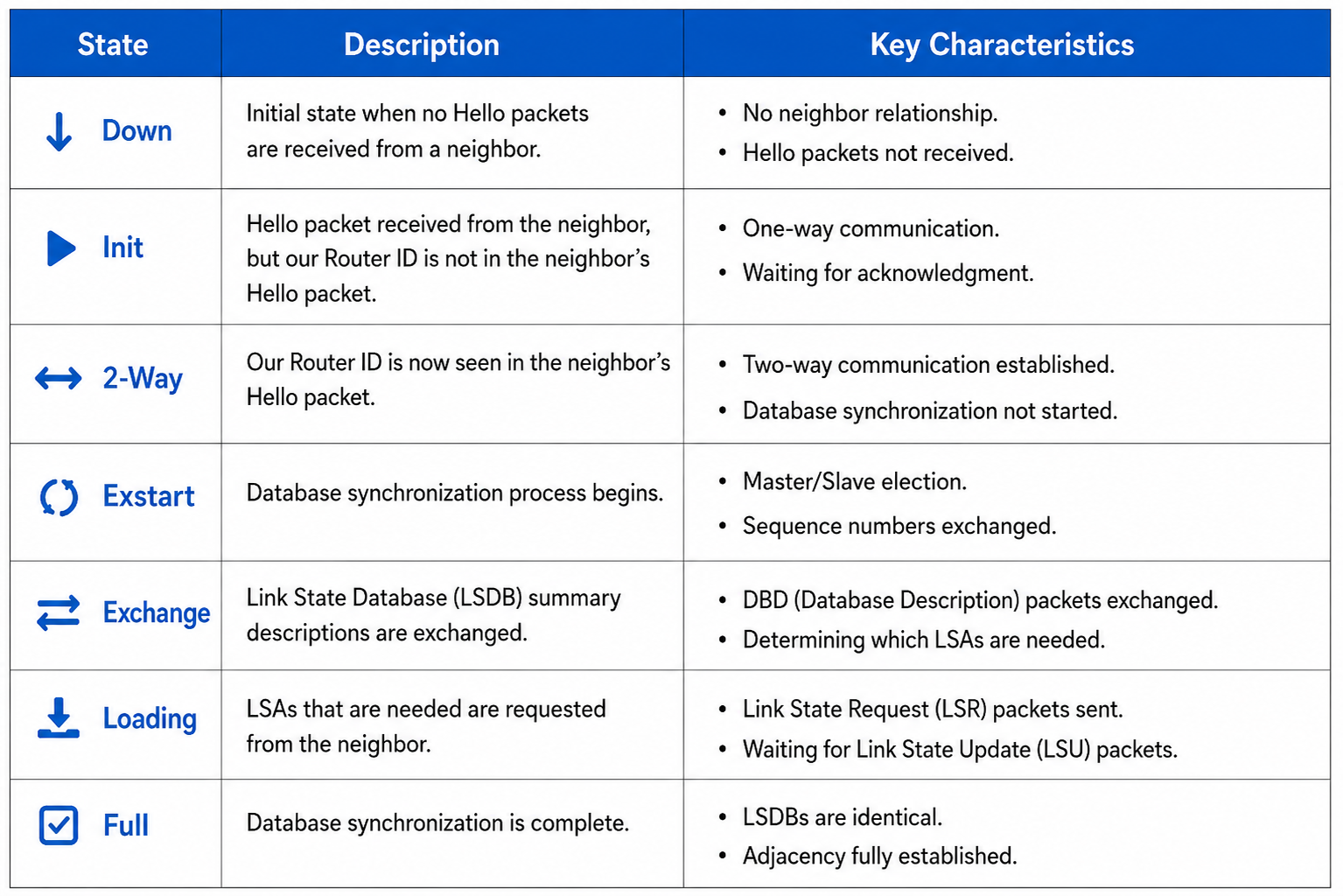
OSPF neighbor state machine — Down through Full.
From study charts · jdepew88 CCNA notes
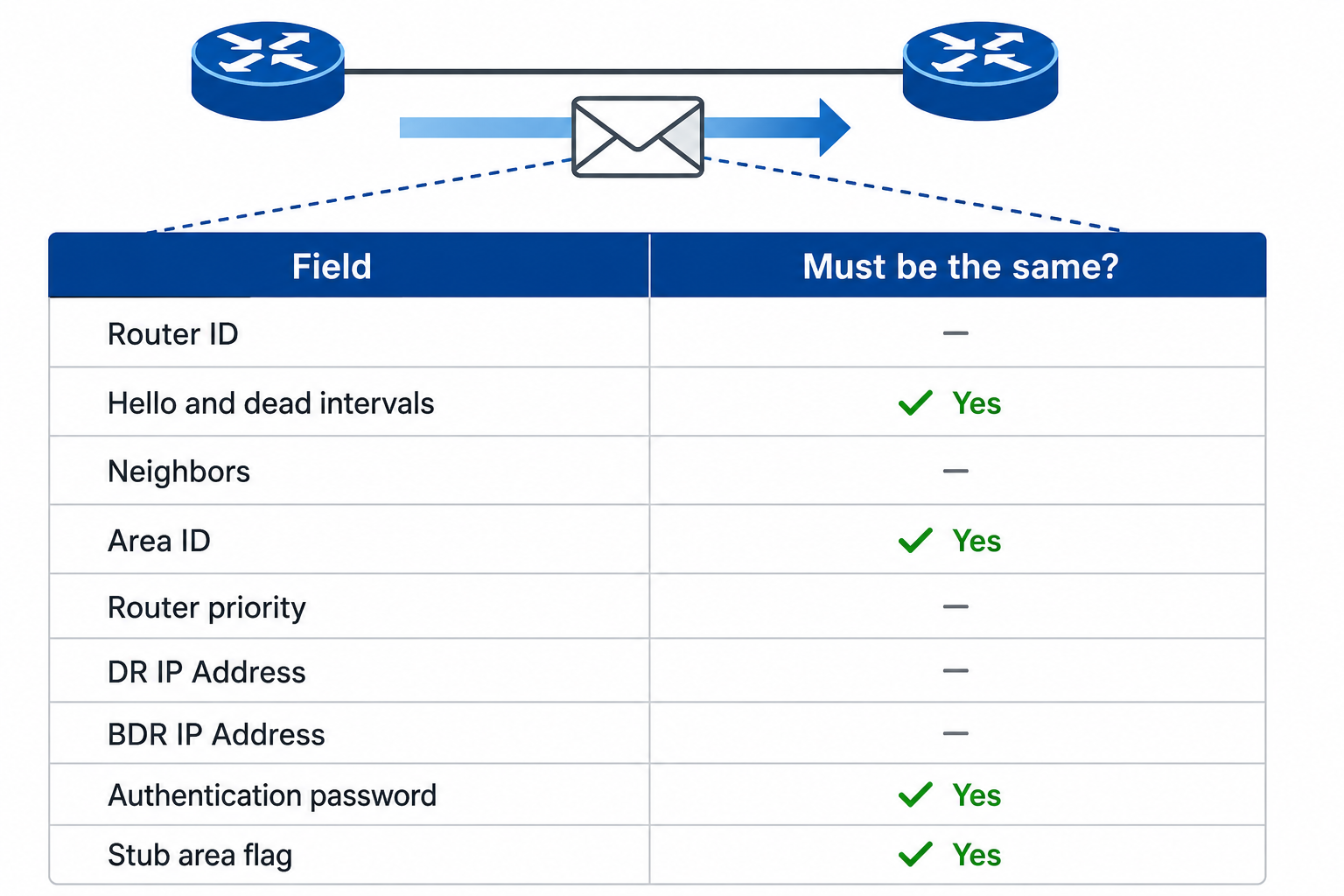
OSPF neighbor adjacency table fields.
From study charts · jdepew88 CCNA notes
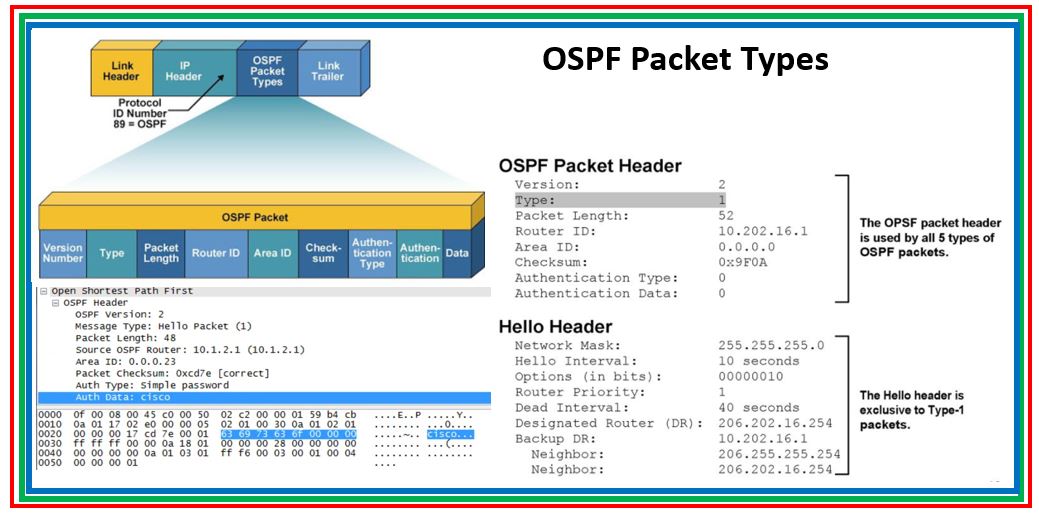
OSPF packet header — 24-byte common header.
From study charts · jdepew88 CCNA notes
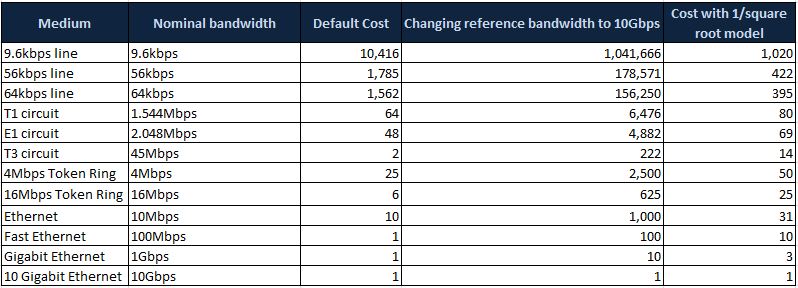
OSPF path cost by interface bandwidth.
From study charts · jdepew88 CCNA notes
Router ID (RID): 32-bit dotted decimal — highest loopback IP, else highest active interface IP, else manual router-id.
Neighbors: Must match area, hello/dead timers, subnet on link, and authentication if used. State FULL = adjacency complete.
DR/BDR on Ethernet: Reduces LSA flooding on multi-access — know roles for exam; point-to-point links skip DR election.
Network types (awareness): broadcast, point-to-point, non-broadcast — CCNA focuses on broadcast and P2P.
Step-by-step — minimal single-area config
Three routers, all interfaces in Area 0:
router ospf 1
 router-id 1.1.1.1
 network 10.0.0.0 0.255.255.255 area 0
Modern alternative per interface:
interface GigabitEthernet0/0
 ip ospf 1 area 0
 ip ospf cost 10
Verify neighbors FULL, routes appear as O.
Commands to know
router ospf 1
router-id 2.2.2.2
passive-interface default
no passive-interface GigabitEthernet0/0
network 192.168.1.0 0.0.0.255 area 0
show ip ospf neighbor
show ip ospf interface
show ip route ospf
show ip protocols
Troubleshooting
| Issue | Check | |-------|-------| | No neighbor | Timers, area mismatch, ACL blocking 89, wrong subnet | | Stuck in EXSTART/2-WAY | MTU mismatch, duplicate RID | | No OSPF routes | Network statement doesn't cover interface, passive interface | | Suboptimal path | Manual cost, reference bandwidth |
show ip ospf neighbor is your first command — no FULL, no LSDB sync.
Exam relevance
All normal OSPF areas connect to Area 0 (backbone). CCNA single-area means everything in Area 0 — still know Area 0 name.
OSPF network uses wildcard mask, not subnet mask — same as ACL rules from Week 2.
Practice checklist
- Configure OSPF on three-router lab in Area 0 only
- Set manual router-id and verify with show commands
- Explain DR/BDR purpose in one sentence
- Read OSPF costs from
show ip ospf interface - Draw neighbor states from DOWN to FULL (high level)
What is OSPF's default administrative distance?
Which OSPF neighbor state indicates a completed adjacency?