Watch first
Routing Fundamentals (Day 11 part 1)
Video credit: Jeremy's IT Lab
Watch on YouTubeOSPF Part 1 (Day 26)
Video credit: Jeremy's IT Lab
Watch on YouTubePlain-English explanation
show ip route is the router's forwarding map. Each line shows a prefix, administrative distance / metric, next-hop IP or exit interface, and how the route was learned (code letter).
If you can read this output fluently, half of routing troubleshooting is already done — you know whether the router even has a path.
Deep dive
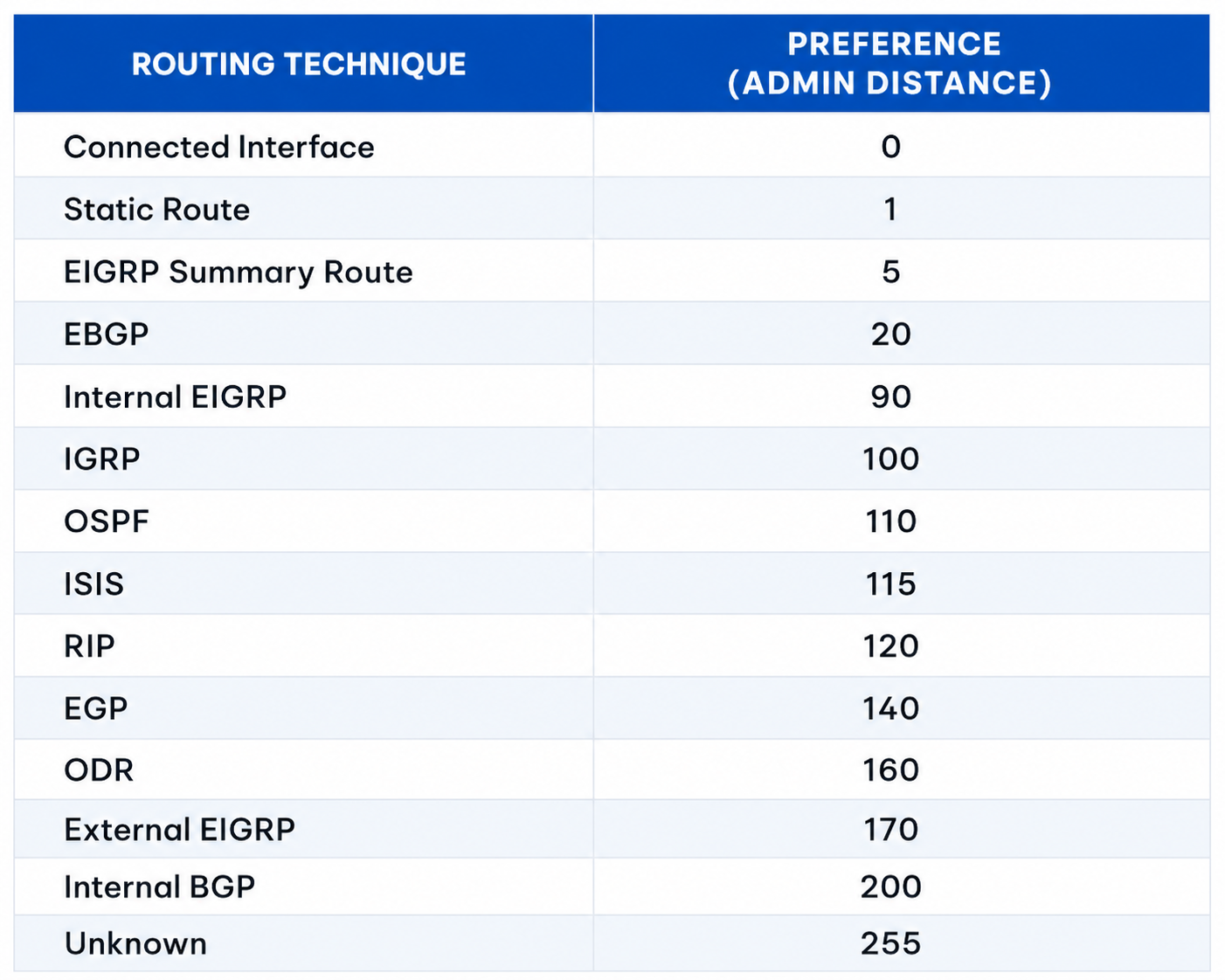
Administrative distance — lower is more trusted. OSPF = 110, static = 1, connected = 0.
From study charts · jdepew88 CCNA notes
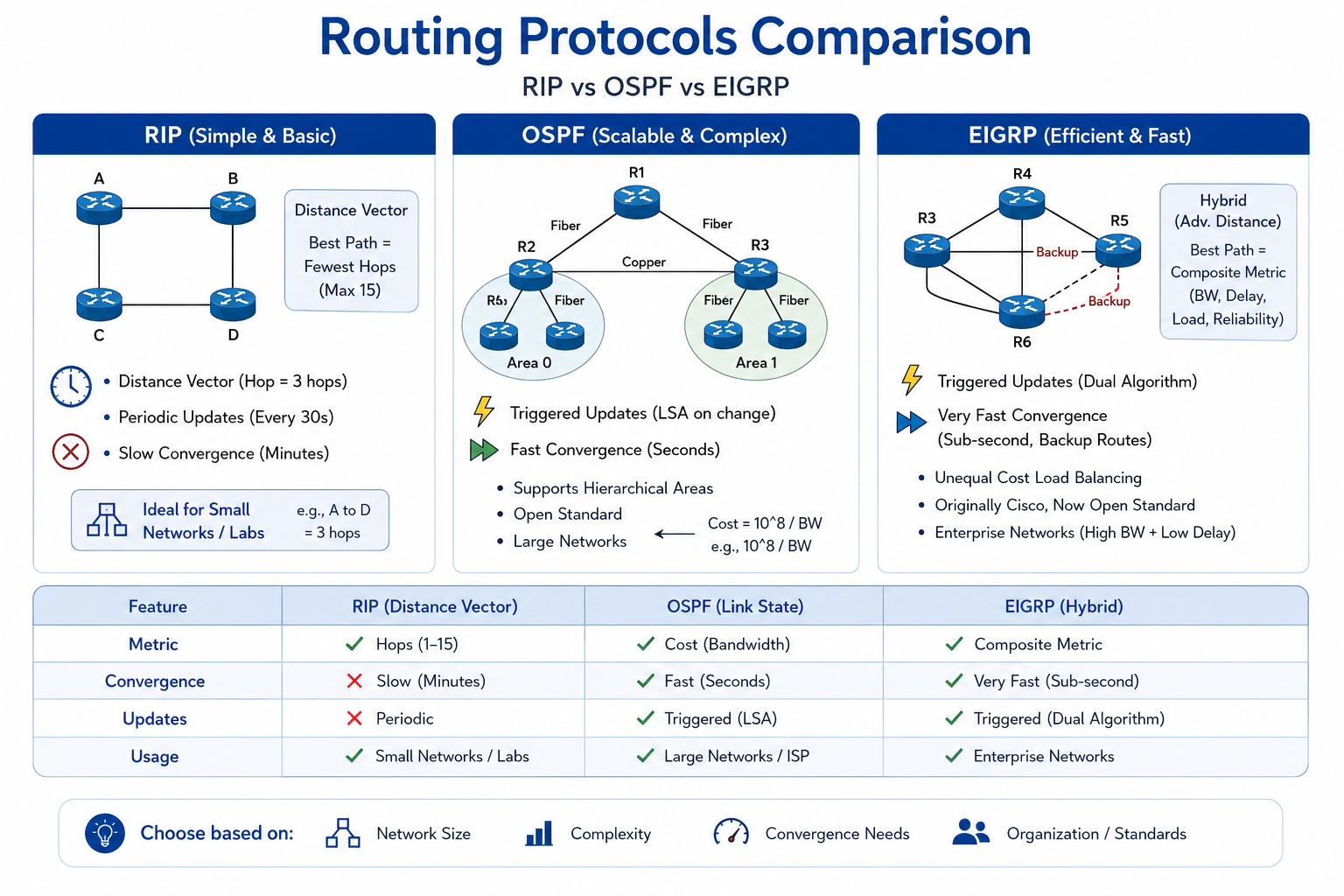
Routing protocol comparison at a glance.
From study charts · jdepew88 CCNA notes
Common codes:
| Code | Meaning | |------|---------| | C | Connected | | S | Static | | O | OSPF | | D | EIGRP (know exists) | | R | RIP (legacy) | | * | Default route candidate |
Example line breakdown:
O 10.1.0.0/16 [110/20] via 192.168.1.2, 00:05:00, GigabitEthernet0/1
- O = OSPF
- [110/20] = AD 110, OSPF cost 20
- via 192.168.1.2 = next-hop
- GigabitEthernet0/1 = outgoing interface
- Timer = route age
Connected example:
C 192.168.1.0/24 is directly connected, GigabitEthernet0/0
Gateway of last resort: 0.0.0.0/0 with S* or static default.
Step-by-step — read a small table
Gateway of last resort is 203.0.113.1 to network 0.0.0.0

C    10.10.10.0/24 is directly connected, Vlan10
L    10.10.10.1/32 is directly connected, Vlan10
S    192.168.0.0/16 [1/0] via 10.10.20.2
O    172.16.0.0/12 [110/30] via 10.10.20.2, 00:12:00, Vlan20
S*   0.0.0.0/0 [1/0] via 203.0.113.1
Questions:
- How reach 172.16.5.5? → OSPF via 10.10.20.2
- How reach 8.8.8.8? → Default via 203.0.113.1
- Is 10.10.10.50 local? → Yes, connected /24
Commands to know
show ip route
show ip route ospf
show ip route static
show ip route connected
show ip route 172.16.5.5
Troubleshooting
| Missing route symptom | Table tells you | |----------------------|-----------------| | No OSPF route | Adjacency or network statement issue | | Static present, not used | Better AD route exists — check LPM | | Only default for internal net | Missing specific route redistribution/advertisement | | Connected missing | Interface down or wrong IP |
Always check gateway of last resort line — confirms if default exists.
Exam relevance
L local host routes (/32) appear for router's own interface IPs on modern IOS — do not confuse with the connected subnet route C.
OSPF uses cost; static often shows [1/0]. AD is first number — lower preferred across sources.
Practice checklist
- Explain every field in five sample routing table lines
- Given output, answer "which next-hop for X?" for ten IPs
- Identify why a static route might not be used
- Use routing table trainer tool for timed practice
- Correlate connected interfaces with
show ip int brief
In 'O 10.0.0.0/8 [110/50]', what does 110 represent?
Which code indicates a directly connected network?