Watch first
Routing Fundamentals (Day 11 part 1)
Video credit: Jeremy's IT Lab
Watch on YouTubePlain-English explanation
Routers connect IP networks. When a packet arrives, the router:
- Decapsulates the frame and reads the destination IP
- Looks up the longest matching prefix in the routing table
- Forwards out the exit interface or to a next-hop IP on a multi-access network
Hosts use a default gateway for destinations outside their subnet. Routers use routing tables built from connected interfaces, static configs, and dynamic protocols.
Deep dive
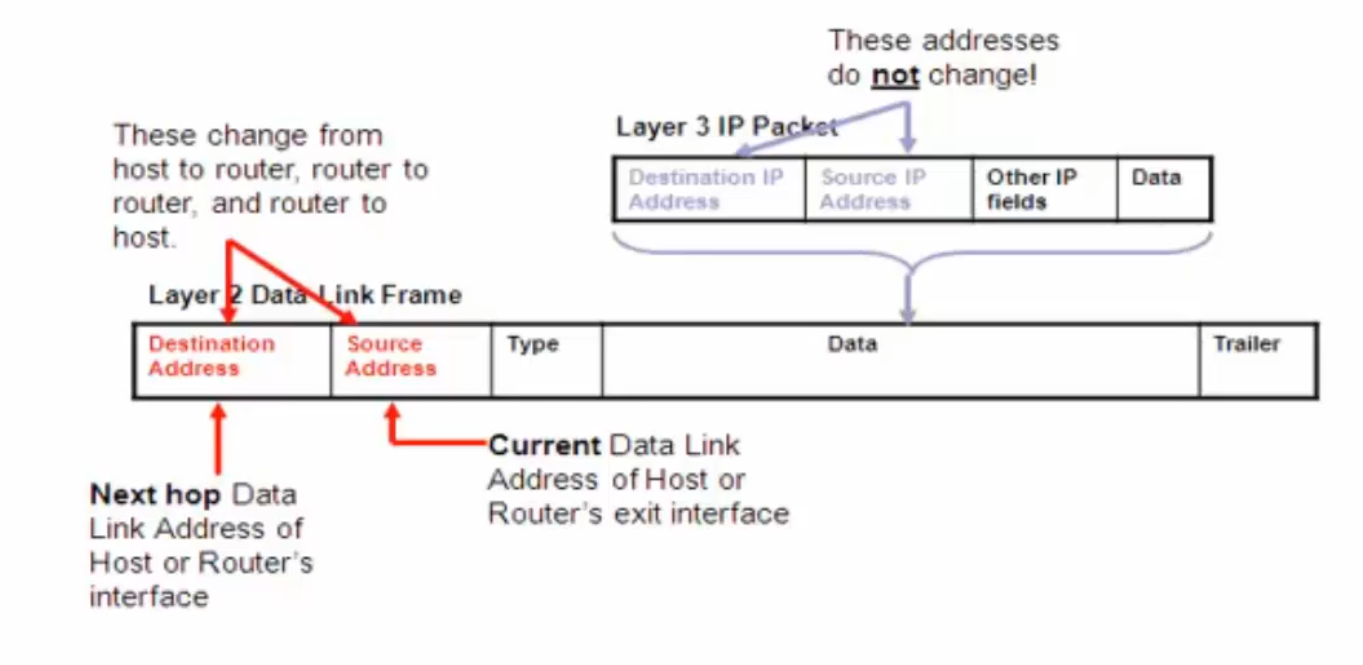
Frame vs packet — switching uses MACs; routing uses IP addresses.
From study charts · jdepew88 CCNA notes

WAN topology patterns — hub-and-spoke vs mesh.
Supplementary figure from Panagiss CCNAmd
Additional topic reference
Connected routes: Appear when an interface is up/up with a valid IP — highest trust, AD 0.
Static routes: Admin-defined — ip route dest mask next-hop|interface.
Dynamic routes: Learned from OSPF, EIGRP (legacy mention), etc. — AD and metric decide preference.
| Route source | Admin distance (typical) | |--------------|--------------------------| | Connected | 0 | | Static | 1 | | OSPF | 110 | | External EIGRP | 170 |
Recursive lookup: If route says next-hop 10.1.1.2, router must know how to reach 10.1.1.2 (another table lookup).
Step-by-step — first-hop routing decision
Network: PC 192.168.1.10/24, gateway R1 192.168.1.1, remote server 10.0.0.50/24 via R1→R2.
- PC sends packet to 10.0.0.50 in IP header, frame to R1 MAC
- R1 strips frame, finds route 10.0.0.0/24 via next-hop R2 or exit interface
- R1 ARPs if needed, new frame toward R2
- R2 delivers to server subnet
Each hop decrements TTL; TTL 0 → ICMP time exceeded.
Commands to know
show ip route
show ip route connected
show ip route static
show ip interface brief
Troubleshooting
| Symptom | Check | |---------|-------| | Remote unreachable | Missing route or wrong next-hop | | Works one direction | Asymmetric routing or return path missing | | Gateway unreachable from host | ARP, VLAN, or interface down | | Route in table but blackholed | Next-hop unreachable |
Ping the next-hop, not only the final destination, when isolating router hops.
Exam relevance
Connected networks appear automatically — you do not need a static route for subnets directly attached to an up/up interface.
Point-to-point serial may use exit interface only; Ethernet multi-access needs next-hop IP for ARP.
Practice checklist
- Read a sample routing table and explain each line's meaning
- Trace a packet across two routers using only routing tables
- Compare host default gateway vs router default route
- Identify connected vs static routes in
show ip routeoutput - Draw a topology with three subnets and label router paths
What does a router use to decide where to forward a packet?
Which route type appears automatically when an interface is configured and up?