Watch first
Spanning Tree Protocol Part 1 (Day 20)
Video credit: Jeremy's IT Lab
Watch on YouTubeRapid STP / Rapid PVST+ (Day 22)
Video credit: Jeremy's IT Lab
Watch on YouTubePlain-English explanation
Redundant links between switches prevent single failures — but without Spanning Tree Protocol (STP), loops cause broadcast storms, MAC table instability, and duplicate frames. STP builds a loop-free logical tree by blocking redundant paths.
Rapid PVST+ (RPVST+) is Cisco's per-VLAN rapid STP — faster convergence than classic STP using proposal/agreement instead of waiting full timers.
Deep dive

Without STP, redundant switch links cause broadcast storms.
Supplementary figure from Panagiss CCNAmd

Root, designated, and blocking port roles in a loop-free tree.
Supplementary figure from Panagiss CCNAmd
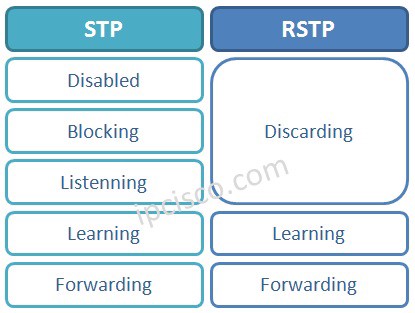
Classic STP vs RSTP port states.
From study charts · jdepew88 CCNA notes
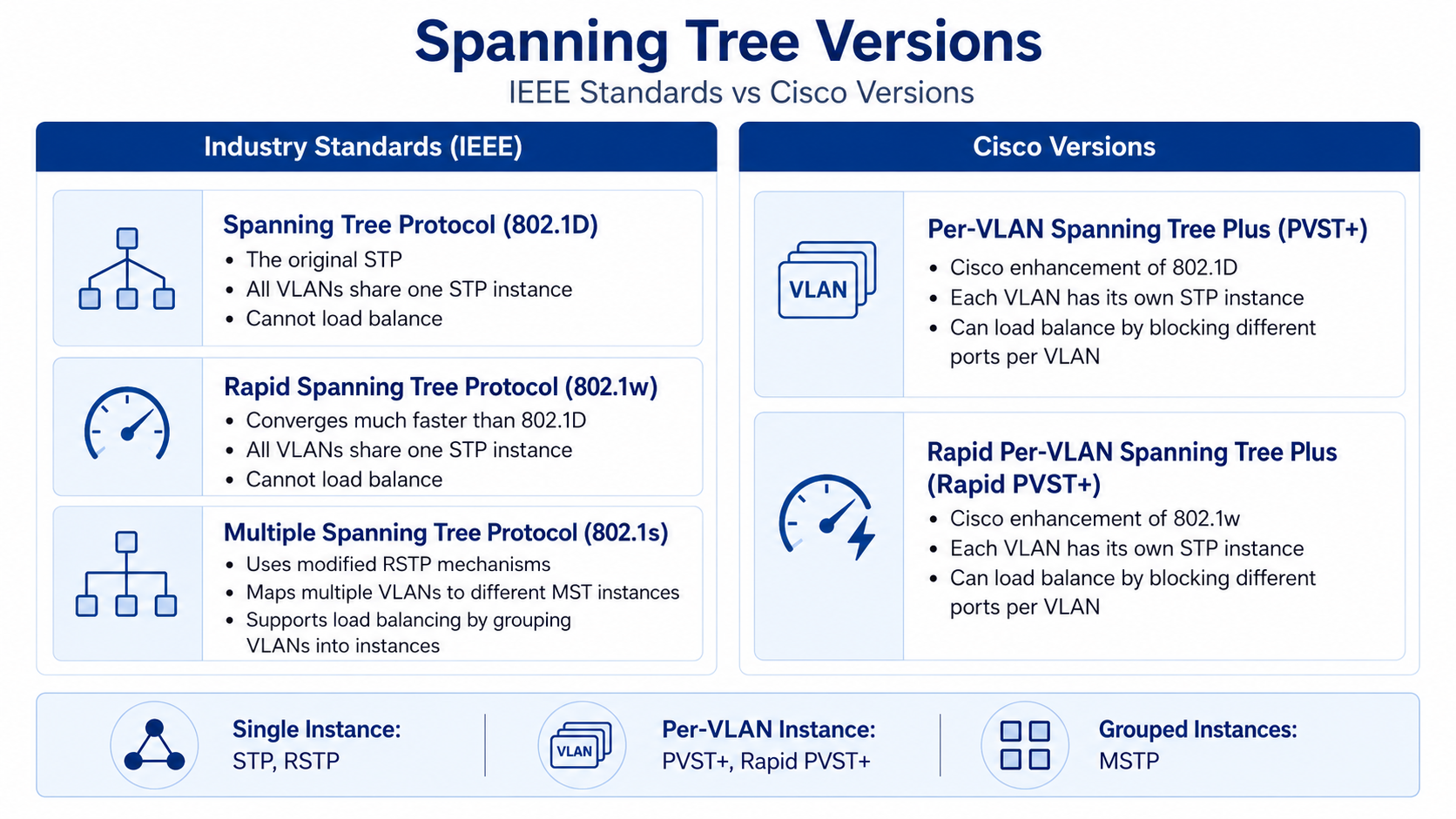
Rapid PVST+ port state progression.
From study charts · jdepew88 CCNA notes
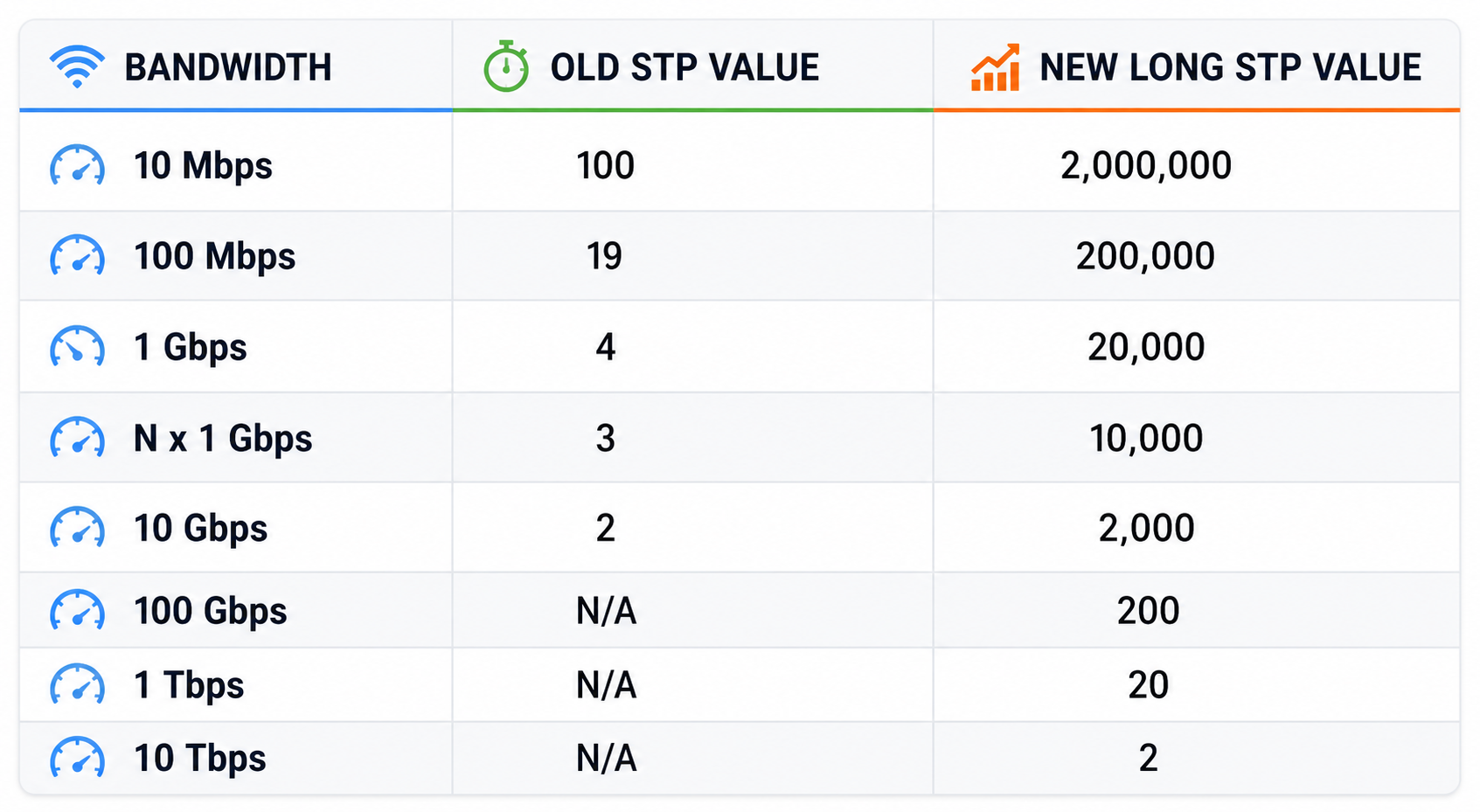
Default STP port cost by link speed.
From study charts · jdepew88 CCNA notes
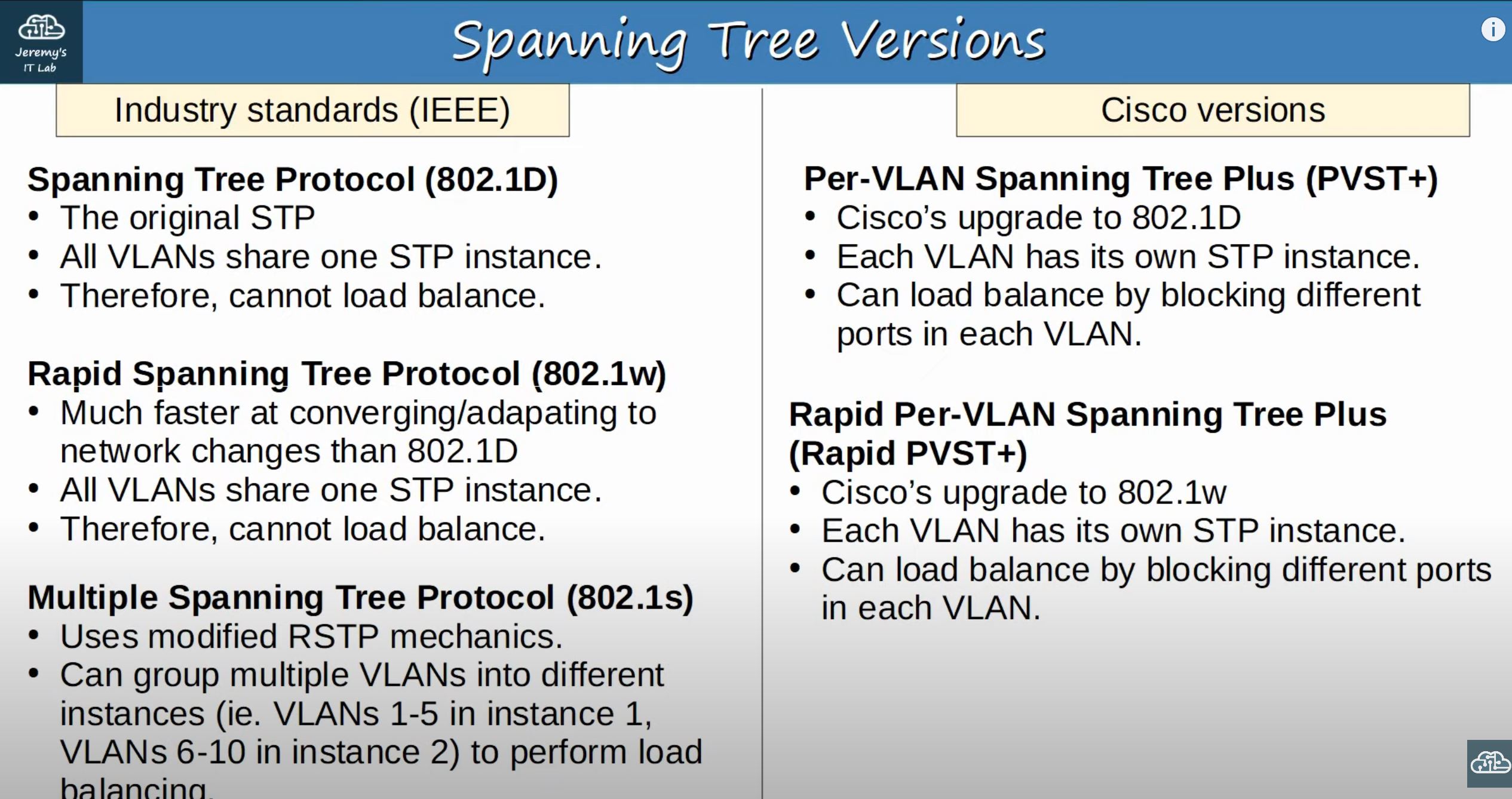
STP variants compared — know PVST+ and RPVST+ for CCNA.
From study charts · jdepew88 CCNA notes
Additional topic reference
Root bridge election: Lowest bridge priority (default 32768 + VLAN ID in PVST+) wins; tie-break lowest MAC.
Port roles:
| Role | Meaning | |------|---------| | Root | Best path toward root for the switch | | Designated | Best path onto a segment — forwards | | Alternate / Backup | Blocked redundant path |
Classic STP timers: Hello 2s, forward delay 15s, max age 20s — slow convergence.
RPVST+: Per-VLAN instances, faster transitions, still know BPDU basics for CCNA.
Port states (classic): Blocking → Listening → Learning → Forwarding (Disabled). RPVST+ uses discarding/learning/forwarding — know exams may reference either conceptually.
Step-by-step — predict blocked port
Triangle: SW-A, SW-B, SW-C fully meshed. Root is SW-A (lowest priority).
- All links toward root from B and C become root or designated where appropriate
- One link between B–C (or slowest path to root) becomes blocked
- If root fails, blocked port transitions to forwarding — convergence event
Draw the tree before looking at show spanning-tree.
Commands to know
show spanning-tree
show spanning-tree vlan 10
show spanning-tree root
spanning-tree vlan 10 priority 4096
spanning-tree vlan 10 root primary
Troubleshooting
| Symptom | Likely STP-related cause | |---------|---------------------------| | Broadcast storm | Loop — STP off, BPDU filter, or uni-directional link | | Link up but not forwarding | Blocking/alternate — check spanning-tree | | Slow failover | Classic STP timers — consider Rapid PVST+ | | VLAN-specific outage | Per-VLAN STP root different — check per VLAN |
Never disable STP to "fix" slowness without removing physical loops.
Exam relevance
Root port is the best inbound port toward root — not "port on root bridge." Root bridge ports are all designated.
PortFast on access ports skips STP wait for end hosts — never on trunks between switches.
Practice checklist
- Given priorities and MACs, elect root bridge
- Mark root, designated, and blocked ports on a three-switch diagram
- Compare classic STP vs RPVST+ convergence in one paragraph
- Run
show spanning-tree vlan 1on a lab switch and interpret - Relate STP blocked ports to redundant uplink design
What is the primary purpose of Spanning Tree Protocol?
Which bridge becomes the STP root by default?