Watch first
VLANs Part 2 — Trunks & 802.1Q (Day 17)
Video credit: Jeremy's IT Lab
Watch on YouTubePlain-English explanation
Trunk links carry multiple VLANs between switches (and to routers). 802.1Q inserts a 4-byte tag in each frame naming the VLAN ID. Access ports send untagged frames — the switch assigns VLAN by port config.
The native VLAN is the one VLAN sent without a tag on a trunk (default VLAN 1). Both ends of a trunk must agree on native VLAN and allowed VLANs or you get subtle one-way failures.
Deep dive
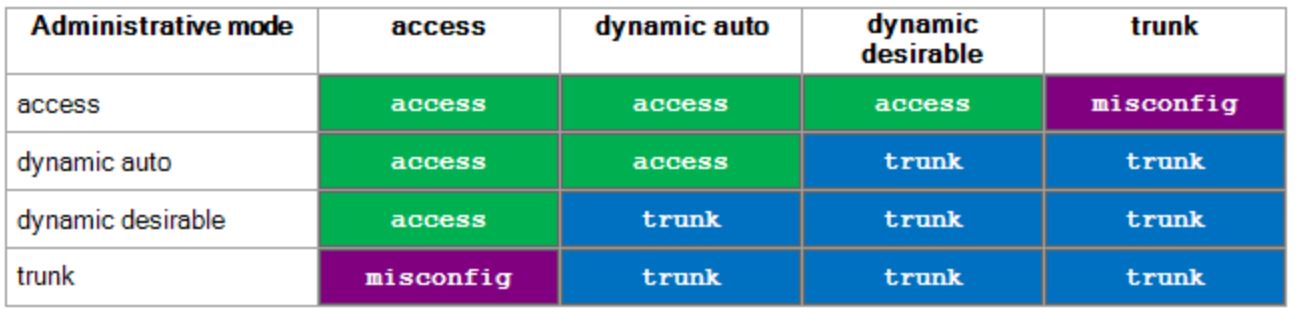
Dynamic Trunking Protocol (DTP) modes — trunk vs access and resulting link type.
From study charts · jdepew88 CCNA notes
802.1Q tag fields: TPID 0x8100, PCP, DEI, VID (12 bits) → 4094 usable VLANs.
DTP (Dynamic Trunking Protocol): Cisco-proprietary negotiation — can form trunk dynamically. CCNA: know switchport mode trunk vs dynamic desirable/auto. Best practice: explicit trunk on known uplinks.
Allowed VLAN list: Restrict which VLANs cross a trunk — security and loop containment.
| Setting | Risk if mismatched | |---------|-------------------| | Native VLAN | Untagged traffic lands in wrong VLAN — CDP/STP issues | | Allowed VLANs | VLAN missing on one side — one-way connectivity | | Trunk vs access | Native VLAN sprawl, security hole |
Step-by-step — configure router-on-a-stick
Router R1 connects to SW1 Gi0/1 (trunk). VLANs 10 and 20 need gateways.
interface GigabitEthernet0/0.10
 encapsulation dot1Q 10
 ip address 10.10.10.1 255.255.255.0
!
interface GigabitEthernet0/0.20
 encapsulation dot1Q 20
 ip address 10.10.20.1 255.255.255.0
!
interface GigabitEthernet0/0
 no ip address
!
interface GigabitEthernet0/1
 switchport mode trunk
 switchport trunk allowed vlan 10,20
 switchport trunk native vlan 99
Verify subinterfaces and trunk on both sides.
Commands to know
interface GigabitEthernet0/1
switchport trunk encapsulation dot1q
switchport mode trunk
switchport trunk native vlan 99
switchport trunk allowed vlan 10,20,30
show interfaces trunk
show interfaces GigabitEthernet0/1 switchport
Troubleshooting
| Symptom | Check |
|---------|-------|
| One-way VLAN reachability | Allowed list missing VLAN on one switch |
| CDP native VLAN mismatch | show cdp neighbors detail / show interfaces trunk |
| Host on wrong VLAN | Access port assigned wrong VLAN, not trunk issue |
| Untagged traffic in VLAN 1 unexpectedly | Native VLAN mismatch |
Native VLAN mismatch is a classic exam and real-world trap — always verify both ends.
Exam relevance
Native VLAN traffic is untagged. Tagged frames include 802.1Q header. Do not tag traffic on access ports to PCs in standard configs.
Many designs change native from VLAN 1 to an unused VLAN for security — both trunk peers must match.
Practice checklist
- Configure a two-switch trunk with allowed VLANs
- Set native VLAN to 99 on both sides and verify
- Explain tagged vs untagged with a diagram
- Identify native VLAN mismatch from show output
- Complete Week 3 lab trunk section
Which protocol adds a VLAN ID tag to Ethernet frames on a trunk?
On an 802.1Q trunk, which VLAN is typically sent untagged?