Overview
VLANs segment broadcast domains; trunks carry multiple VLANs with 802.1Q tags. CCNA covers access vs trunk ports, native VLAN mismatches, voice VLAN, VTP awareness, and DTP negotiation traps.
Why VLANs exist
A campus switch network without VLANs is one large Layer 2 broadcast domain. Switches flood broadcast traffic (ARP, DHCP, unknown unicast) to every port — including across IP subnets. That wastes bandwidth, forces every host to process irrelevant traffic, and bypasses router/firewall security policies because broadcast frames never reach a Layer 3 enforcement point.
VLANs (Virtual LANs) segment the LAN into separate broadcast domains at Layer 2. There is typically a one-to-one relationship between a VLAN and an IP subnet: Engineering in VLAN 10 / 10.10.10.0/24, Sales in VLAN 20 / 10.10.20.0/24. Hosts in different VLANs must route through a Layer 3 device (router, firewall, or L3 switch SVI) to communicate.
VLAN advantages (exam framing)
| Benefit | What it means on the exam |
|---|---|
| Segmentation | Departments, guests, servers, and voice each get isolated broadcast domains |
| Flexibility | Move a host to another VLAN by changing port config — no recabling |
| Security | Combine VLAN isolation with inter-VLAN ACLs; voice VLAN keeps PC traffic off the call path |
| Performance | Broadcasts stay within their VLAN instead of flooding the entire campus |
VLAN assignment can be static (admin configures switchport access vlan) or dynamic (VMPS — rarely tested at CCNA depth). Voice VLAN is a special static case for IP phones.
Access ports
Access ports connect end hosts. Each access port belongs to exactly one VLAN. The host is not VLAN-aware — the switch assigns membership when untagged frames arrive.
vlan 10
name ENGINEERING
!
interface GigabitEthernet0/1
switchport mode access
switchport access vlan 10
show vlan brief
show interfaces GigabitEthernet0/1 switchport
VLAN ID ranges: Normal VLANs 1–1005; extended 1006–4094. VLAN 1 is the default on Cisco switches — avoid using it as your production data or native VLAN when policy allows.
Trunk ports and 802.1Q
When multiple VLANs must cross a link between switches (or to a router), use a trunk. 802.1Q inserts a 4-byte tag naming the VLAN ID (12-bit VID → 4094 usable VLANs). The receiving switch forwards only to ports in that VLAN and strips the tag before sending to an access host.
ISL (Inter-Switch Link) was Cisco-proprietary and is obsolete — CCNA expects 802.1Q only.
interface GigabitEthernet0/24
description Trunk to SW2
switchport trunk encapsulation dot1q
switchport mode trunk
switchport trunk allowed vlan 10,20,30
Allowed VLAN list: Restrict which VLANs cross the trunk — security and loop containment. If VLAN 30 is allowed on SW1 but not SW2, you get one-way connectivity (classic exam symptom).
Native VLAN
The native VLAN is the VLAN for untagged frames on a trunk. Default is VLAN 1. Both trunk ends must agree on native VLAN and allowed VLANs.
Native VLAN mismatch is a top CCNA trap. If SW1 native = VLAN 1 and SW2 native = VLAN 99, untagged traffic lands in different VLANs on each side. CDP reports a mismatch; connectivity for untagged/native traffic fails even when tagged VLANs work.
Best practice: change native VLAN to an unused VLAN (not VLAN 1) on both ends.
vlan 199
name NATIVE
!
interface GigabitEthernet0/1
switchport trunk encapsulation dot1q
switchport mode trunk
switchport trunk native vlan 199
Voice VLAN
IP phones typically use a data VLAN for the PC plugged into the phone and a separate voice VLAN for call traffic. This provides QoS priority for voice and security separation so the PC cannot easily capture phone packets on the same broadcast domain.
interface FastEthernet0/10
description IP Phone + PC
switchport mode access
switchport access vlan 10
switchport voice vlan 20
The phone learns the voice VLAN via CDP or LLDP-MED from the switch. See the Voice VLAN topic for phone boot and CUCME context.
Dynamic Trunking Protocol (DTP)
DTP is Cisco-proprietary and negotiates whether a link becomes a trunk or stays access. CCNA expects you to know the modes and the resulting link type — then disable DTP in production.
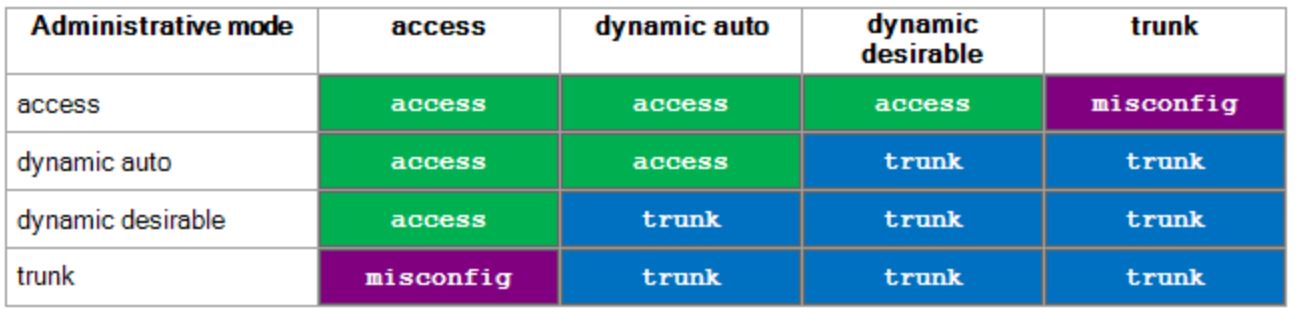
DTP mode combinations — know what forms a trunk vs access.
From study charts · jdepew88 CCNA notes
| DTP mode | Behavior |
|---|---|
| dynamic auto | Trunks if neighbor is trunk or desirable; two autos = access (default on newer switches) |
| dynamic desirable | Trunks if neighbor is trunk, desirable, or auto (default on older switches) |
| trunk | Forces trunk; negotiates if neighbor uses DTP |
| access | Forces access |
| nonegotiate | Disables DTP frames — use with switchport mode trunk |
Exam best practice: switchport mode trunk plus switchport nonegotiate on known uplinks. Never rely on DTP auto/auto or auto/desirable surprises in a security-sensitive design.
interface GigabitEthernet0/1
switchport trunk encapsulation dot1q
switchport mode trunk
switchport nonegotiate
switchport trunk allowed vlan 10,20,30
switchport trunk native vlan 199
VLAN Trunking Protocol (VTP)
VTP propagates VLAN create/delete/rename across switches in a VTP domain over trunk links. It saves typing on large campuses but carries serious operational risk.
| VTP mode | Can edit VLANs locally? | Advertises / syncs? |
|---|---|---|
| Server | Yes | Yes — default mode |
| Client | No | Yes — syncs from highest revision |
| Transparent | Yes (local only) | Passes VTP through; does not participate |
VTP messages flood to multicast 01-00-0C-CC-CC-CC (shared with CDP). Revision numbers increment on each VLAN database change.
VTP revision trap: A new switch with VTP client mode and a higher revision number from another domain can overwrite the entire VLAN database on your production domain — potentially deleting VLANs network-wide. Before adding switches: set revision to 0 (vtp mode transparent then back), or use transparent/off mode. Many admins disable VTP entirely.
vtp domain CORP
vtp mode server
!
show vtp status
VTP updates the VLAN database only — you still configure switchport access vlan on each port manually.
Inter-VLAN routing (brief)
Hosts in different VLANs need a Layer 3 gateway:
- Router with separate interfaces — one physical leg per VLAN
- Router-on-a-stick — one trunk/subinterface per VLAN on a single cable
- Layer 3 switch (SVIs) —
interface vlan 10withip routingenabled; intra-campus routing stays on the backplane
interface GigabitEthernet0/0.10
encapsulation dot1Q 10
ip address 10.10.10.1 255.255.255.0
!
interface GigabitEthernet0/0.20
encapsulation dot1Q 20
ip address 10.10.20.1 255.255.255.0
Exam checklist
| Trap | What goes wrong |
|---|---|
| Native VLAN mismatch | Untagged traffic in wrong VLAN; CDP mismatch |
| Allowed VLAN list mismatch | One-way VLAN connectivity |
| DTP auto + auto | Link stays access when you expected trunk |
| VTP high revision client | VLAN database wiped across domain |
| Forgetting voice VLAN | Phone registers but no audio / wrong QoS |
| Trunk vs access on uplink | All VLANs missing on downstream switch |
Verification commands
show interfaces trunk
show interfaces GigabitEthernet0/1 switchport
show vlan brief
show dtp interface GigabitEthernet0/1
show vtp status
Quick lab workflow
- Create VLANs and names on all switches (or sync via VTP if you accept the risk)
- Assign access ports to data VLANs; add
switchport voice vlanon phone ports - Configure trunks with matching native VLAN, allowed list, and explicit
mode trunk - Add inter-VLAN routing (SVI or router-on-a-stick)
- Verify with
show vlan brief,show interfaces trunk, and ping across VLANs from a host