Overview
Redundant switch links need STP to prevent Layer 2 loops; EtherChannel bundles links for bandwidth and resiliency. CCNA covers port roles, Rapid PVST+, root bridge election, and LACP/PAgP modes.
The problem: Layer 2 loops
Redundant links between switches improve availability — but without loop prevention, Ethernet has no TTL. A broadcast (ARP, DHCP, unknown unicast) can circulate forever, multiplying at every switch. CPU utilization spikes, MAC tables flap, and the network becomes unusable. This is a broadcast storm.

Without STP, redundant switch links cause broadcast storms that overwhelm CPU and bandwidth.
Supplementary figure from Panagiss CCNAmd
Spanning Tree Protocol (STP) builds a loop-free logical tree by blocking redundant paths while keeping them physically cabled for failover. STP is enabled by default on Cisco switches.
How STP works
- Switches exchange Bridge Protocol Data Units (BPDUs) out all ports when they come online
- Switches elect a root bridge — the center of the spanning tree
- Each non-root switch picks one root port (best path toward the root)
- On each segment, one designated port forwards; redundant ports become blocking/alternate
- Ports do not forward user traffic until STP confirms the port is loop-free
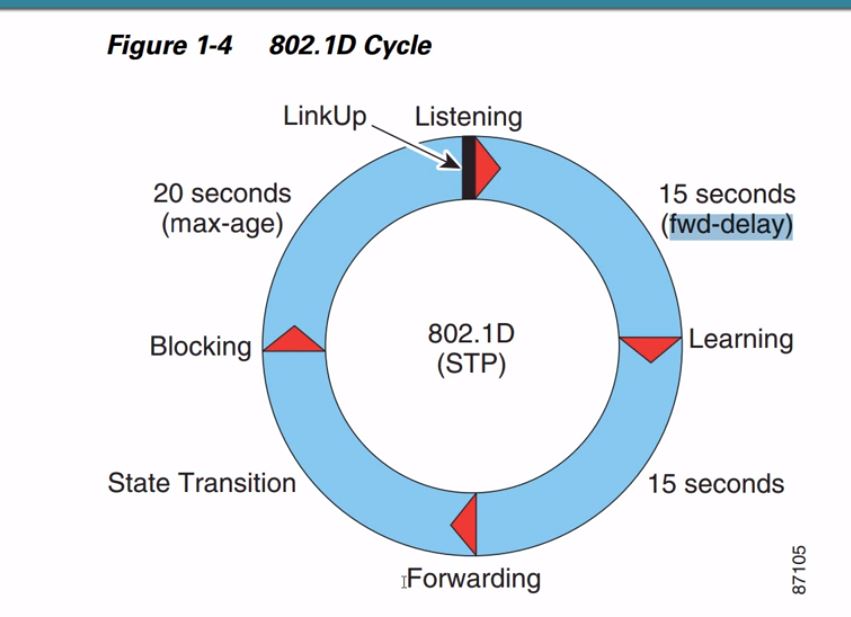
Classic 802.1D convergence can take up to ~50 seconds (max age 20s + forward delay 15s × 2). Production networks use faster variants.
Root bridge election
The root bridge is elected by lowest Bridge ID:
- Bridge priority (0–65535; default 32768) — lower wins
- Tie-break: lowest MAC address
In PVST+/RPVST+, the effective priority is often 32768 + VLAN ID per VLAN instance.
Best practice: manually set core switches as root — spanning-tree vlan 10 root primary (priority 24576) and root secondary (28672) on the backup core. Without this, the oldest switch (lowest MAC) may become root by accident.
spanning-tree vlan 10 root primary
spanning-tree vlan 10 root secondary
!
show spanning-tree vlan 10 root
Port roles

Root, designated, and blocking port roles in a loop-free spanning tree.
Supplementary figure from Panagiss CCNAmd
| Role | Definition |
|---|---|
| Root port | Best path to root bridge on a non-root switch (one per switch) |
| Designated port | Best path onto a segment — forwards traffic |
| Alternate / Backup | Redundant path — blocking in classic STP |
Seven-step exam method
- Determine the root bridge (lowest Bridge ID)
- All ports on the root are designated
- On every other switch, find the root port (lowest cost to root)
- The port on the other end of each root-port link is designated
- On remaining links, one port blocks
- Blocking port = highest cost to root (or highest Bridge ID tie-break)
- Draw the tree before reading
show spanning-tree
Root port selection tie-breakers: lowest root path cost → lowest sender Bridge ID → lowest sender port ID.
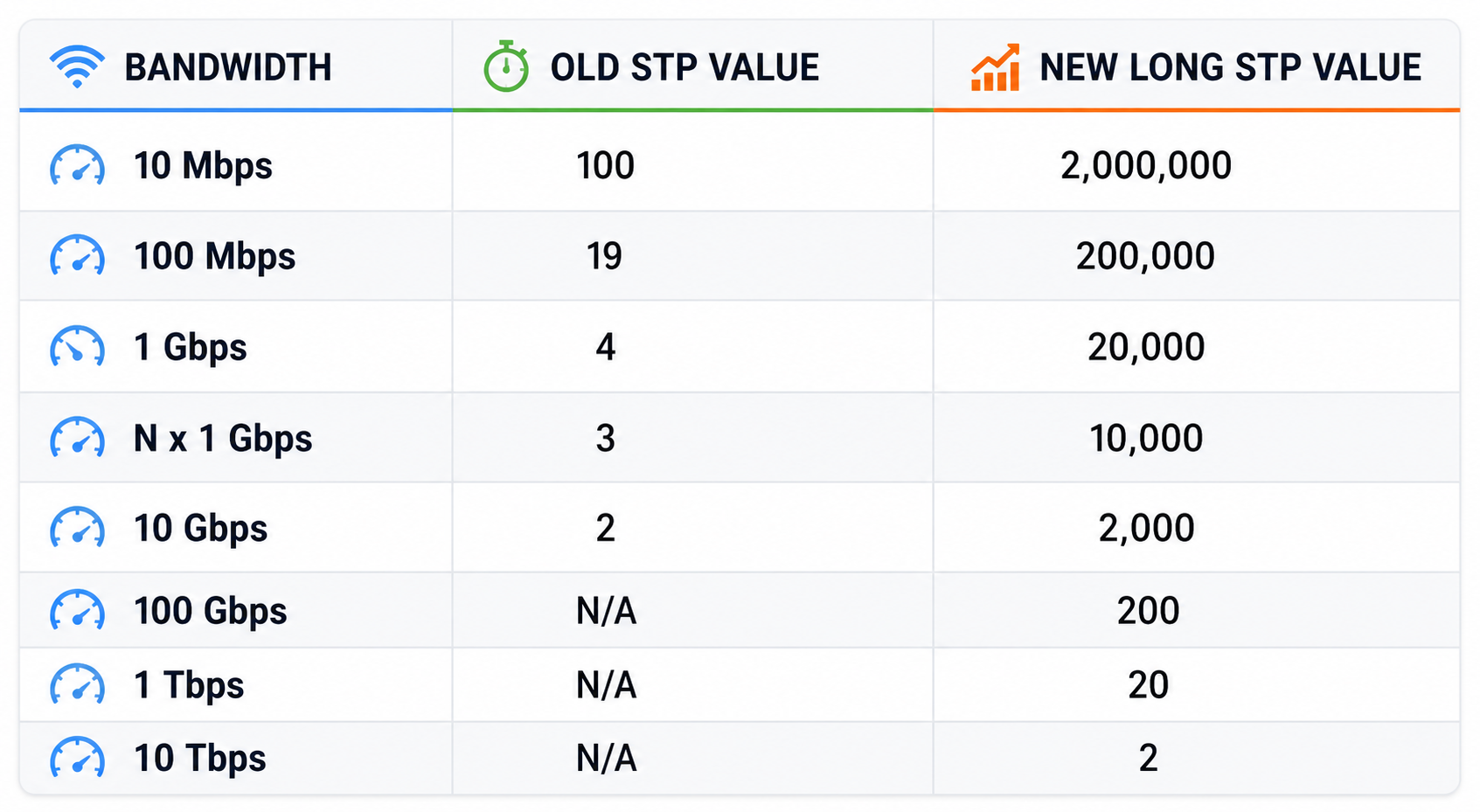
Default STP port cost by link speed — memorize for root/designated port questions.
From study charts · jdepew88 CCNA notes
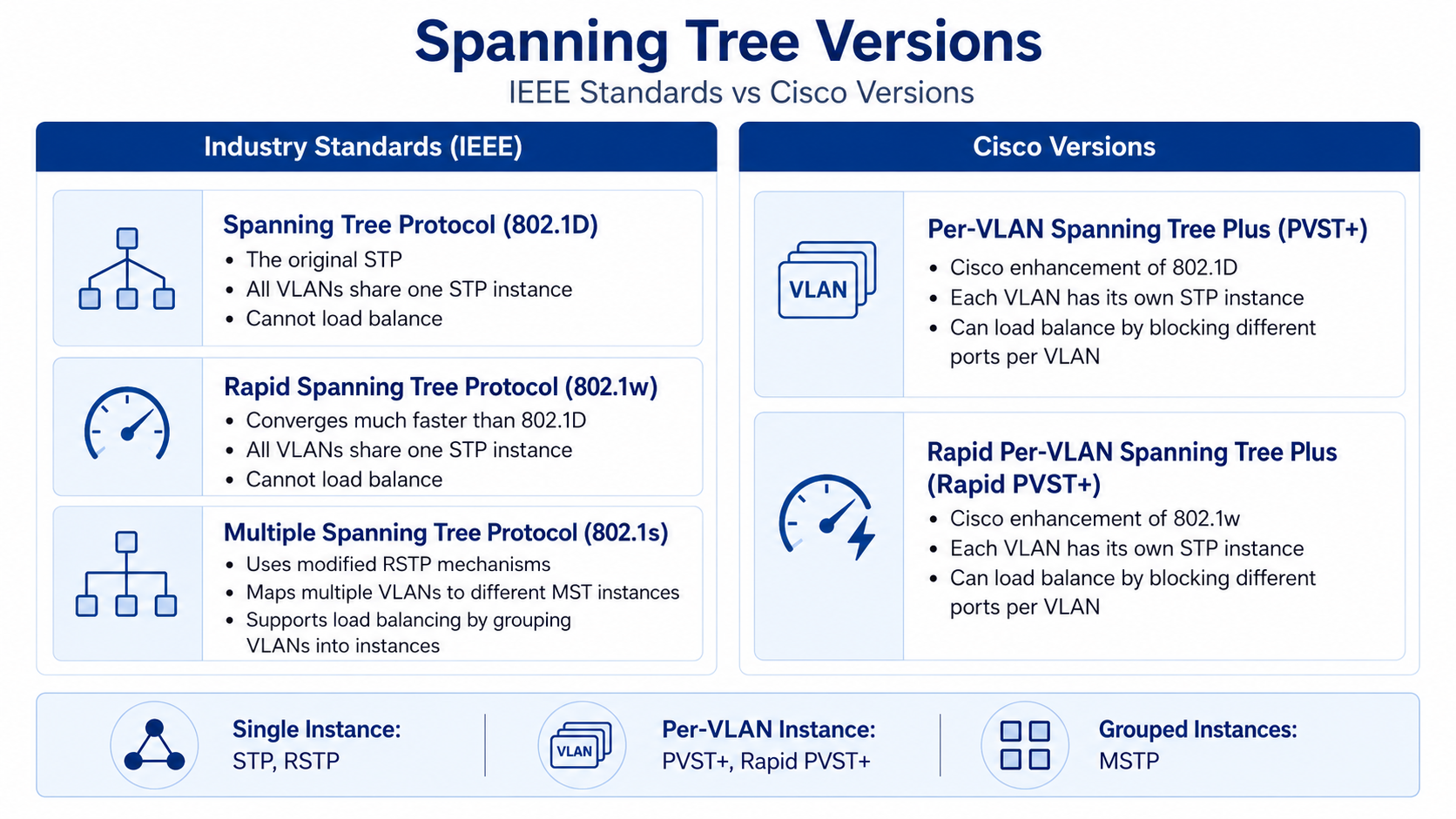
STP versions (know for CCNA)
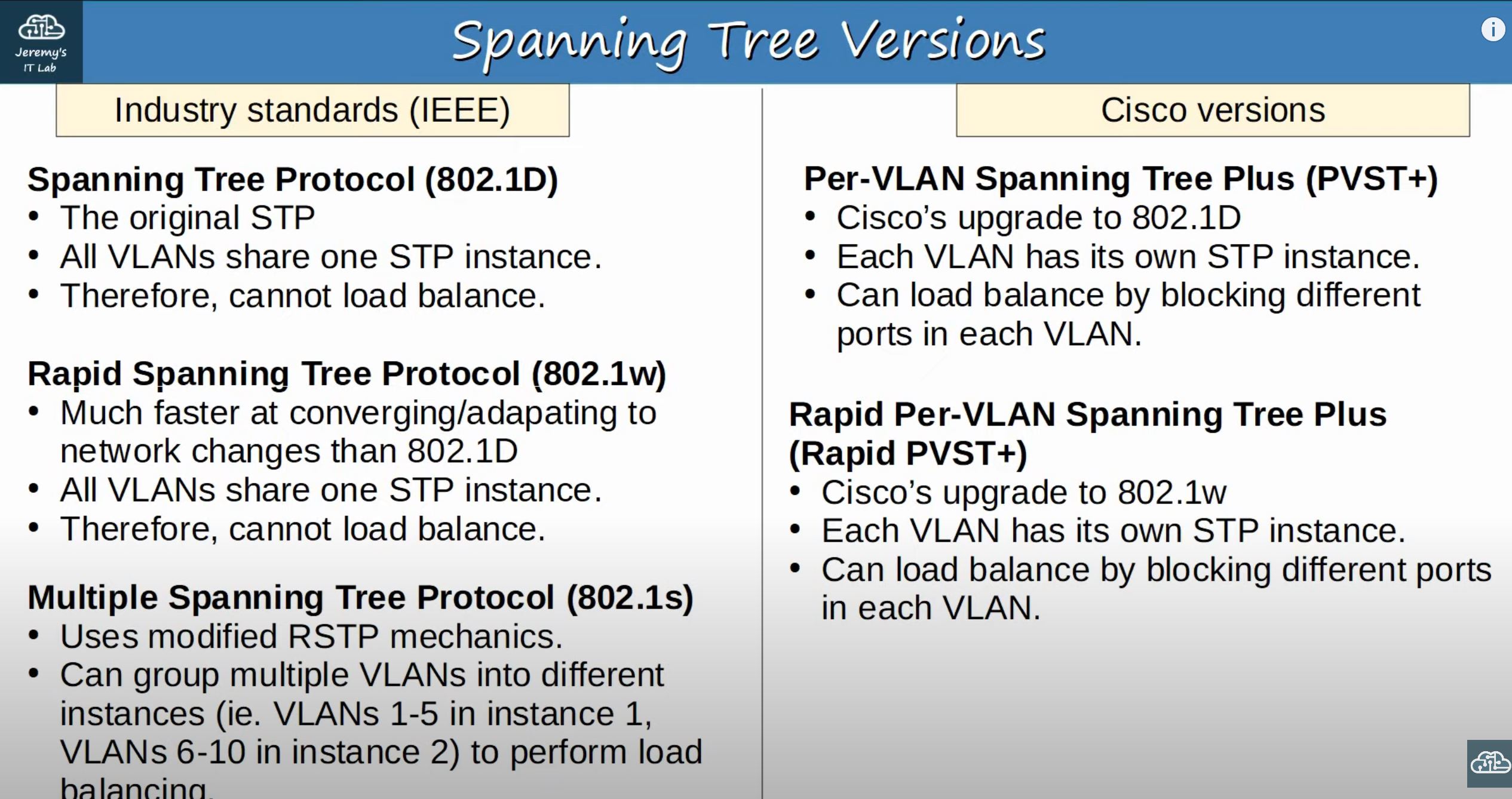
STP variants — CCNA focuses on PVST+ and Rapid PVST+.
From study charts · jdepew88 CCNA notes
| Standard / Cisco | Scope | Notes |
|---|---|---|
| 802.1D STP | One tree for all VLANs | Slow; Blocking → Listening → Learning → Forwarding |
| 802.1w RSTP | One tree, fast convergence | Proposal/agreement handshake |
| 802.1s MSTP | Groups VLANs into instances | Load-balance roots per instance |
| PVST+ | Per-VLAN 802.1D (Cisco default) | Separate root per VLAN possible |
| RPVST+ | Per-VLAN 802.1w (Cisco) | CCNA default on modern switches — fast per-VLAN convergence |
Per-VLAN STP — each VLAN can have a different blocked port.
From study charts · jdepew88 CCNA notes
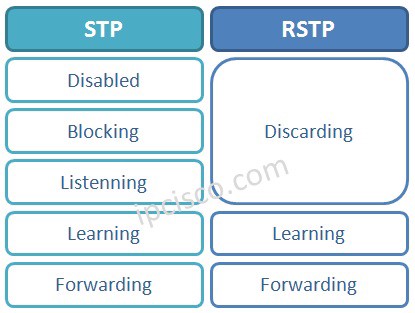
Classic STP vs RSTP port states.
From study charts · jdepew88 CCNA notes
Rapid PVST+ port state progression — discarding, learning, forwarding.
From study charts · jdepew88 CCNA notes
RPVST+ uses discarding instead of blocking/listening. Exams may reference classic states conceptually even when the switch runs RPVST+.
Portfast and BPDU Guard
Portfast puts access ports into forwarding immediately — appropriate only where no switch can attach (single host). If someone plugs a switch into a Portfast port, loops can form instantly.
BPDU Guard shuts the port (err-disable) if a BPDU arrives — protecting against rogue switches on access ports.
interface GigabitEthernet0/10
spanning-tree portfast
spanning-tree bpduguard enable
!
spanning-tree portfast default
spanning-tree portfast bpduguard default
Root Guard (on distribution/core ports) prevents an access-layer switch from becoming root — port goes root-inconsistent if superior BPDUs arrive.
EtherChannel
Multiple physical links bundled into one logical Port-channel give bandwidth aggregation without STP blocking individual member links. STP sees the bundle as a single interface.

EtherChannel — STP treats the bundle as one link, so no member is blocked for loop prevention.
Supplementary figure from Panagiss CCNAmd
Aliases: Port-channel, LAG, link bundle. Server-side equivalent: NIC teaming / bonding.
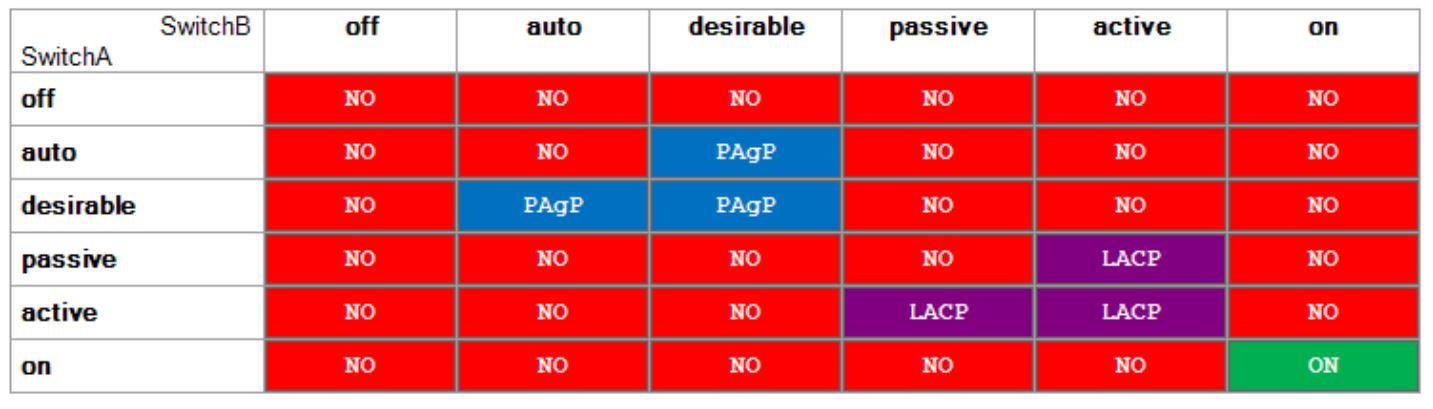
EtherChannel negotiation modes — LACP active/passive and PAgP desirable/auto.
From study charts · jdepew88 CCNA notes
EtherChannel rules (exam favorites)
- Member interfaces must match: speed, duplex, access vs trunk, VLAN settings
- Configure the Port-channel interface — do not rely on per-member settings alone
- Mismatched configs → bundle won't form
| Protocol | Standard? | Modes | Result if both passive/auto |
|---|---|---|---|
| LACP (802.3ad) | Open standard | active / passive | No bundle |
| PAgP | Cisco proprietary | desirable / auto | No bundle |
| Static (on) | N/A | mode on | Must match both sides — no negotiation |
interface range GigabitEthernet0/23-24
channel-group 1 mode active
!
interface Port-channel 1
switchport mode trunk
switchport trunk allowed vlan 10,20,30
show etherchannel summary
show interfaces Port-channel 1
show spanning-tree vlan 10
EtherChannel misconfiguration trap: Mixing access and trunk on members, different native VLANs, or different allowed VLAN lists prevents the port-channel from forming. Always verify show etherchannel summary — look for (P) bundled vs (D) down.
STP + HSRP alignment (bonus context)
When HSRP provides the default gateway, align the active HSRP router with the STP root path for each VLAN. Otherwise traffic hairpins through an extra hop (e.g., active gateway on CD2 while STP root path goes through CD1).
Exam checklist
| Trap | Detail |
|---|---|
| Wrong root bridge | Oldest/lowest-MAC switch becomes root if priorities tie at default |
| Confusing port cost vs port priority | Cost is cumulative path metric; port priority breaks ties on same cost |
| Blocking port on wrong link | Re-draw tree — blocking is on the higher-cost side of the redundant link |
| EtherChannel + STP | STP blocks whole bundle or none — not individual members |
| Portfast without BPDU Guard | User-plugged switch causes immediate loop |
| Per-VLAN STP | VLAN 10 and VLAN 20 may block different physical ports |
Verification workflow
show spanning-tree vlan 10
show spanning-tree vlan 10 root
show spanning-tree interface GigabitEthernet0/1 detail
show etherchannel summary
show interfaces Port-channel 1 trunk
- Identify root bridge and root path cost per VLAN
- Label root, designated, and blocking ports on paper
- Confirm access ports use Portfast + BPDU Guard
- If using redundant links, verify EtherChannel bundles before expecting full bandwidth